Accessing MS Word Reports Related to an object
To access the reports MS Word related to an object:
1. Access the object properties.
2. In the Reporting page, click the drop-down menu and select Saved Reports.
The Reports MS Word section lists the Reports MS Word related to the object.
Opening a Report MS Word Related to an Object
To open a report MS Word:
1. Access the reports MS Word related to the object.
2. In the report MS Word list, right-click the report MS Word and select Documentation > Open.
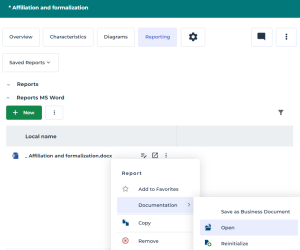
The report opens in MS Word.
 The first time you open a separate window, your web browser may request authorization to open unexpected windows. If so, accept.