Planning Assessment Campaigns
When campaign scope has been defined and assessment sessions created, you can plan the campaign.
This consists of distributing assessments between the different assessment sessions.
To plan the campaign:
1. In the properties of the assessment campaign, select the Planning tab.
 The Planning tab is visible only when assessment sessions have been created.
2. In the right pane, select the assessment sessions in which you want to assess the objects (for example risks) in their context (for example entities ).
If you don't see the previously created assessment sessions, click the Refresh button.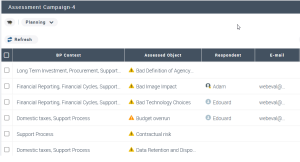 Respondents are specified at step Defining assessment campaign scope.
Next step: Validating Assessment Campaigns.