Analyzing Container Dependency Errors
This dependency analysis report examines the objects used in the models and checks that this use is foreseen in the dependencies declared between the imported libraries.
Creating an analysis report for container dependency errors
To create an analysis report for container dependency errors from the navigation menu Reports.
1. Click the Create a report button.
2. In the Filters section, select the “Referential Consistency” Category.
3. Select the Container Dependencies Errors Analysis report and click Create a report.
A parameters specification dialog box opens.
4. Click the Connect button and select the container you wish to analyse.
5. Click Preview.
The new report appears.
6. Click Continue.
The property page of the new report appears.
7. Fill the Name and the description of the report, then click Save and open.
8. The report appears in the edit area.
Report description
This report is used to check the consistency of the use of architecture building blocks within the framework of a container with respect to:
• dependencies declared for the containers (for example, a library) imported by the container examined (for example an Enterprise),
• owner libraries of architecture building blocks.
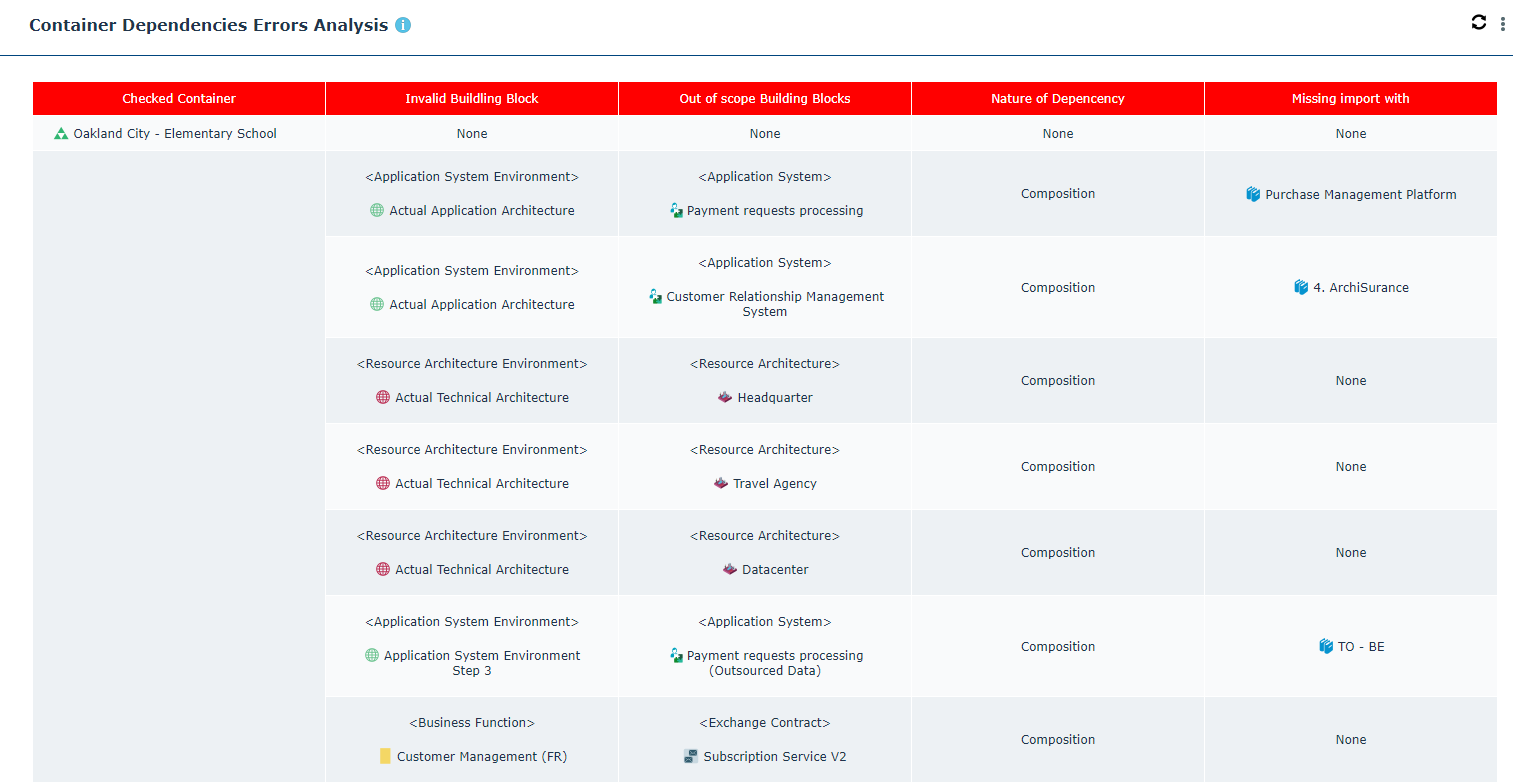
Example of a dependency analysis report
The report displays the following columns:
• Container checked: specifies the containers tested (entered as a parameter in the report).
• Non-valid building blocks: specifies which container building block checked presents a non-valid reference, and is therefore not valid,
 Non-valid building blocks in libraries imported by the library entered as a parameter do not appear in the report.
• Building blocks out of context: specifies which object referenced by the building block in the preceding column is not in the declared scope of the container (that is, that the building block is owned neither by the container itself, nor by one of the imported libraries, nor imported individually at the container level).
• Type of dependency: specifies the dependency type of the use between the non-valid building block identified in the second column and the out-of-context building block in the third column (direct or by composition, for example),
• Import missing: specifies the owner of the out-of-context building block that must, for example, be added to the containers imported from the checked container.
Report parameters
Parameter | Parameter type | Constraints |
|---|---|---|
Checked containers | Library Enterprise Building block container | At least one mandatory container. |