SV1- System Properties
To access systems:
1. In the navigation menu, click Systems Viewpoint > SV-1 Systems Interface Description > Systems.
2. In the list of systems, select a system to open its property pages.
3. In the drop-down menu select one of the pages as follows.
System Characteristics
The Characteristics page of a system provides different sections. Besides the Identification section, you can connect use the following to create:
• Capabilities
• System Functions
• Operational Activities
• Measures (KPIs)
System Components
Provides access to the list of system components described in the various diagrams as well as the communications between them.
Structure
Provides access to the list of system components described in its application structure diagram.
For more information, see Application structure diagram.
Scenario
Provides access to the list of system components described in the system flow scenarios.
For more information see Scenario of sytem flows.
Technical Architecture
Provides access to the list of system components described in the application deployment architecture diagrams.
For more information, see Application deployment architecture.
System Usage
Usage > Scenario
Provides access to the list of system components described in its system flow scenarios.
For more information, see Scenario of sytem flows
Usage > Structure
Provides access to the list of application components described in its application structure diagram.
For more information, see Application structure diagram.
Usage > Impact Report (Structure)
Used to analyze the impact of a failure of a system on the application systems that use it or the other systems or application systems as described in its structure diagrams that use the system.
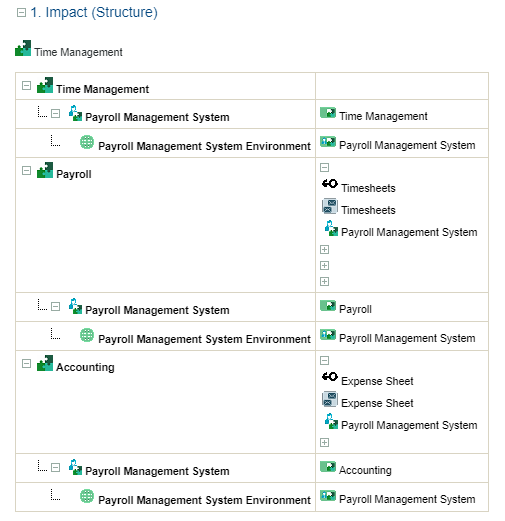
In the "Time Management" system used in the context of the structure diagram below.
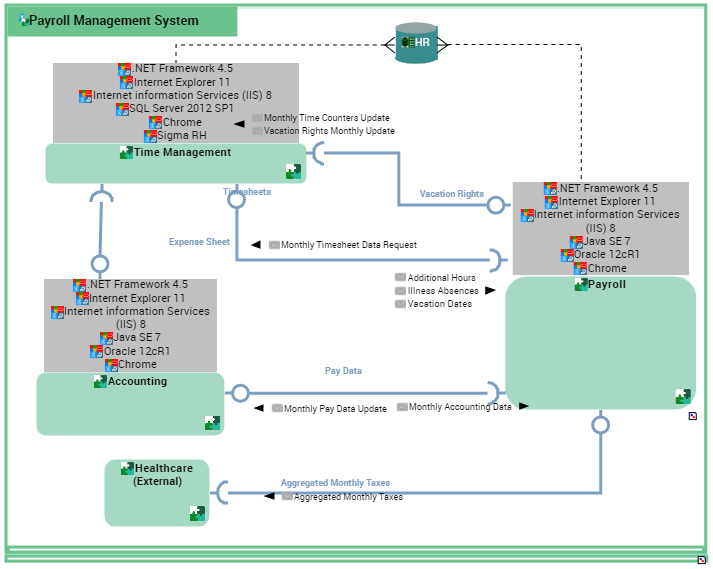
The report presents the list of components with which the system interacts using the exchange contracts.
Usage > Impact Report (Scenario)
Used to analyze the impact of the failure of:
• a system on the application systems that use it
• or the other systems or application systems with which it exchanges application flows in the use scenario contexts of this system.
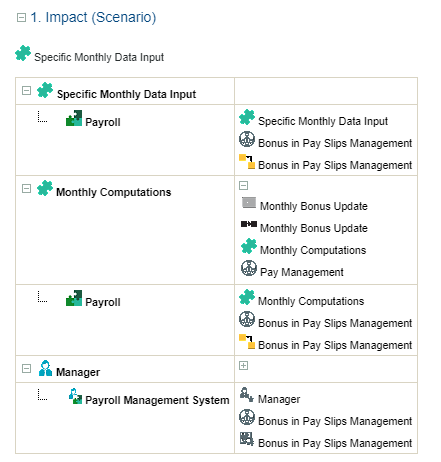
In the example of the "Specific Monthly Data Input" application service used in the context of the flow diagram context below.
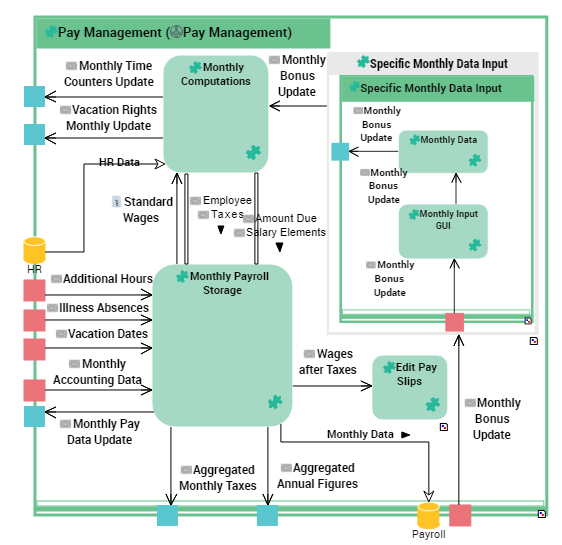
The report presents the list of application flows exchanged with the flow scenario components presented below.
Usage > System Used
To display the systems used by the selected system:
 Select the Usage > System Used page on a system.
The owner operational activity is displayed in a column.

 The Usage > System used page is also available on the following object types :
 • application systems
• IT services
• functionalities
To display the operational activities which are using a particular system:
In the Usage > System used property page of a system, select a system used.The operational activities, activities, system functions or operations which are actually using this system appear in the Element Using a System section.