The associations (Merise)
An association is a relationship that exists between two or more entities. An association is said to be binary when it connects two entities, ternary when it connects three, etc. It can carry properties, ie. attributes that characterize association of the entities.
Examples of associations
To model that an "employee" is responsible for a "service" and to specify the "start date" of his or her functions, the following data model is created, where start date is a property of the association.

Other comparison: links between sheets.
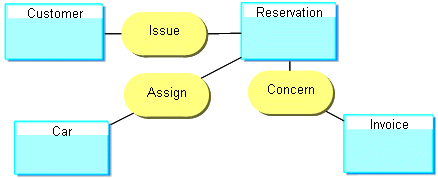
The following drawing provides a three-dimensional view of the situations a data model can store.
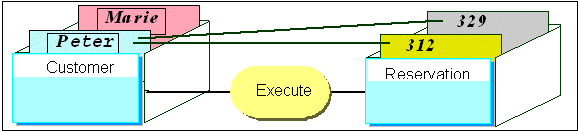
Peter and Mary are clients. Peter has made reservations numbers 312 and 329.
A data model should be able to store all situations in the context of the company, but only these situations.
 The model should not allow representation of unrealistic or aberrant situations.
Reflexive relationships
Certain associations use the same entity.
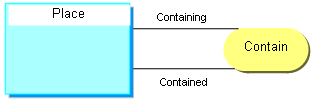
Example
A classroom, a building, and a school are all locations.
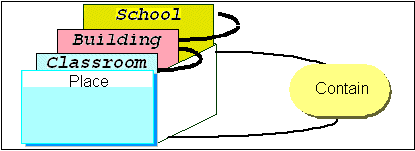
A classroom is contained in a building, which is contained in a school.
"n-ary" relationships
Certain associations associate more than two entities.
These associations are generally rare.
Example
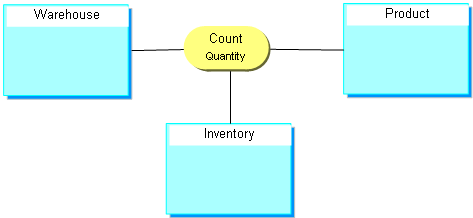
When taking inventory, a certain quantity of product was counted in each warehouse.
Participations or cardinalities
Minimum and maximum cardinalities express the minimum and maximum number of participations of an instance of the entity in an association.
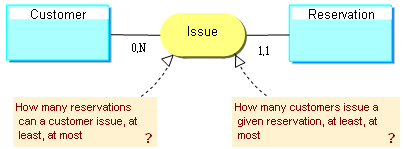
The most common participations or cardinalities are 0,1 1,1 0,N 1,N.
• Optional cardinality: minimum cardinality 0 indicates that the association is not necessarily specified.
• Mandatory participation Minimum cardinality 1 indicates that the association is necessarily specified.
• Unique participation : Maximum cardinality 1 indicates that the entity can be linked by the association once only at most.
• Not unique participation : Maximum cardinality N indicates that the entity can be linked by the association several times.
Example
The following example illustrates the significance of the different cardinalities or participations:
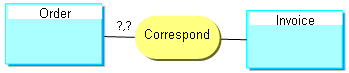
0.1 | An order corresponds to zero or at most one invoice. |
0,N | No restriction is placed on the number of invoices corresponding to an order. This is the default visibility. |
1.1 | Each order has one and only one corresponding invoice. |
1,N | Each order has one or more corresponding invoices. |
Creating an Association (Relationship)
To create an association:
1. Click the Association button  in the objects toolbar.
in the objects toolbar.2. Click one of the entities concerned and drag the mouse to the other entity before releasing the button.
The Add Association dialog box appears.
The arrow at the right of the Name box opens a menu that allows you to:
• Query of existing associations, via the Query dialog box.
• List associations in the repository.
• Create an association.
3. Enter the name of the association, then click Create (Windows Front-End) or Add(Web Front-End)
The association appears in the diagram.
 In case of error, you can delete an object by right-clicking it and selecting the Delete command in its pop-up menu.
 Reflexive relationships
If the creation request is made on an entity without moving the cursor, a reflexive association (also called "reflexive link") is automatically created on the entity.
If there is association of an entity with itself, the roles need to be named in order to distinguish between the corresponding links in the drawing.
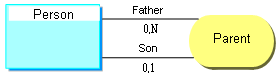
Example:
“Father” and “Son” are the two roles played by the “Person” entity in the “Parent” association.
Specifying participations
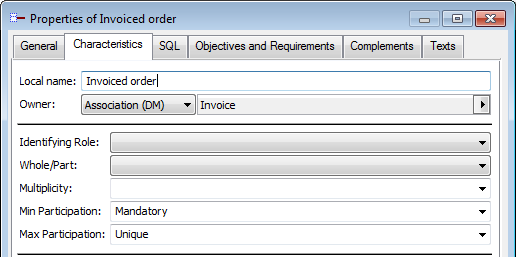
In the Characteristics tab of the property window of roles, you can indicate the minimum and maximum number of participations of each entity to the relationship (cardinalities).