Describing State Concepts
The notion of state of a concept is represented by the State Concept.
 A state concept is a situation in a concept life cycle during which it satisfies certain conditions, executes a certain activity or waits for a concept event. A state concept represents a time interval of which limits are two concept events. A state concept is a phase through which the concept passes during its life cycle.
For example, the same subscription holder can pass from "Child" state to "Adolescent" state, then to "Adult" state and finally "Senior".
Passage from one state concept to another can be conditioned by an Event Concept.
An event concept represents an event occurring during concept life, for example a change of season. An event concept marks the impact on a concept of a phenomenon internal or external to the concept. Concept events can be distinguished as concept start events, end events and intermediate events.For example, passage from one state to another can be connected to a event, a "Birthday" for example.
 For more details, see Describing Event Concepts.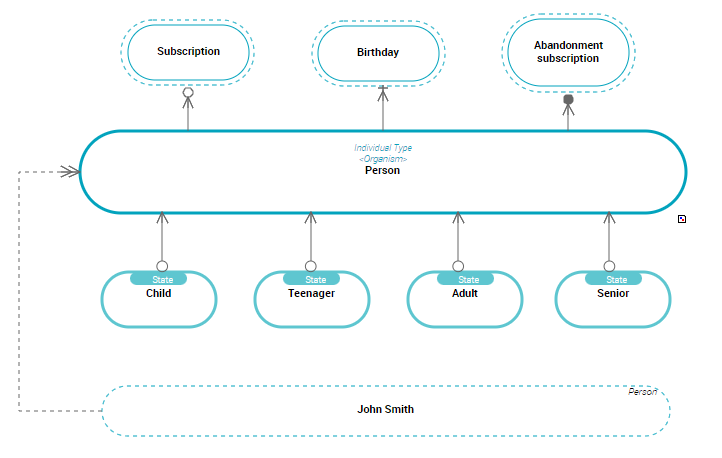
Accessing the state concepts list
To access business dictionary state concepts in HOPEX Data Governance:
1. Click the Glossary > Dictionaries navigation pane.
In HOPEX Data Architecture, click the navigation menu then Business Glossary > Business Information Assets.2. In the edit area, expand the folder of the business dictionary that interests you.
3. Expand the State Concepts folder.
The list of state concepts of the business dictionary appears.
Creating a state concept from a business dictionary
At creation of a state concept, HOPEX also creates a Dictionary State of, which represents the relationship between a state concept and its concept.
A dictionary state enables connection of a concept to a concept state, and specification of the state nature.To create a state concept from a business dictionary:
1. Right-click the business dictionary that interests you and click New > Business Information Building Block.
2. In the wizard select the State Concept object type.
3. Specify the Local Name and click OK.
4. In the State Individual Type field, specify to which concept the state concept you are creating is connected.
A Dictionary State Of is automatically created between the concept and the state concept.5. In the Term section, the Existing Terms section lists terms with the same name as the new state concept.
A term is a word or word group, that is used for a specific meaning in a specific context.If a term has already been created with the same name as the new state concept, this term is automatically connected and appears automatically in the Term section.6. In the Definition Text field, enter the text of the state concept definition and click OK.
The name of the state concept appears in the tree under the business dictionary.
You can also create a state concept in a concept domain.State concept properties
State concept characteristics
The Characteristics tab of state concept properties enables access to its main characteristics.
The state concept is described by:
• its Designation, which is represented by one or several terms,
To modify the name of a concept in the corresponding language, you must access concept properties and modify the name of the term in the specific language. For more details, see Concept and Term.• the Definition Text,
• The Synonyms section enables specification of a list of synonym concepts,
A synonym is a term interchangeable with another term in the context of a concept of this term that has the same or almost the same meaning.For more details, see Concept and Term.• The Realization section enables association of an application architecture element to the concept.
For more information, see HOPEX Logical Data.Links between a state concept and other dictionary elements
In addition to terminology characteristics, a state concept is characterized by its relationships with other dictionary elements.
• The Super-Type tab presents concepts whose properties are inherited by the described concept, for more details see Concept Inheritances
• The Components tab presents:
• the list of concept components owned, for more details see Concept Components.
• the list of concept power components, for more details see Describing Concept Power Components.
Concepts connected to a state concept are not present in the properties dialog box.