Identifying people in charge of designing a process
You can assign the following roles to people involved in the design of a given process;
• Process Owner (he/she must approve process design)
• Process Designer (he/she must design the process)
• Process Contributor (he/she can provide recommendations)
To identify people in charge of designing a given process:
1. Open the Characteristics property page of the process and expand the Responsibility section.
2. Fill the following fields:
• Process Owner with the person in charge of approving the design of the process
• Process Designer with the person in charge of creating the diagram of the process
• Process Contributor with the person in charge of participating in the design of the process
Accessing the Process Validation Workflow
To access the Process Validation Workflow:
 Open the Workflows property page of the process.
 You can display (or hide) tabs using the
  button.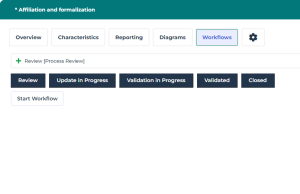
Process Validation Workflow steps
The different steps of a process validation workflow are described in the diagram below.
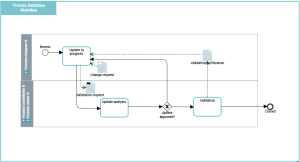
The process designer can start the workflow using the Start Workflow button.
The status of the workflow switches to Update in Progress.Once the process description is finalized, the process designer can send it for approval.
The status of the workflow switches to Validation in Progress.The process owner (or the process contributor) receives a validation request by email. He / she can:
• Request changes
The status of the workflow switches to Update in Progress• Approve process design
The status of the workflow switches to Validated.