Example of Running a Simulation
Let us take the process of order processing as an example.
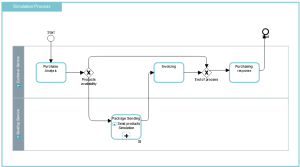
Simulation start event
When a process has several entry points, the simulation editor asks you to choose between the different possible start events.
The routing of the instances in the graph depends on the selected entry point.
 If you change the entry point of an already created scenario, the scenario must be updated, see Updating a simulation scenario.
Tasks
In a BPMN process, tasks are associated with processing steps requiring the intervention of an enterprise participant (for example an org-unit).
A task can be industrial (machining a component), logistical (receiving a delivery), or it can involve information processing (entering an order).
During the simulation, the execution of a task is triggered by the arrival of an instance that has taken the sequence flow that links the task to the other objects describing the process flow.
When an instance arrives at a task, the simulator checks that resources expected for task execution are available. If this is not the case, the instance is placed in a queue until the resource is free.
Participants represent resources needed to perform a task.
If a task is described by a process, the simulation can take into account the detail of the process or remain at the task level, depending on the option selected in the simulation scenario. See Hierarchical description of the simulated process.The simulator does not take into account behaviors of tasks as defined specifically by the BPMN standard. For more details on these behaviors, see Specifying Process Behavior. Behaviors Loop and Multiple must be described explicitly in the model. Resources
Performing the tasks requires the use of resources that can be human, software or hardware, depending on the type of process described.
You can customize their quantity, cost and availability schedule for each simulation scenario.
A task is allowed to use only one resource which must be connected to the participant in charge of the task.Using Gateways
A task may contain several input or output flows. To represent these situations, you must use BPMN gateways and set probabilities. See Probabilities on the sequences flows.
Managing task inputs
Several sequence flows can lead to the same task. In this case, you must define the processing policy of the incoming instances in the task using a gateway Thus, an instance can be the result of the merging of several instances coming from different sequences, a Parallel gateway is then used.
For example, in an order delivery process, the various items that make up the order are processed separately. These items are then assembled to form a single order.
By default, each instance arriving in a sequence is taken into account as soon as the resources required for its processing are available. Input policy is then an Exclusive policy.
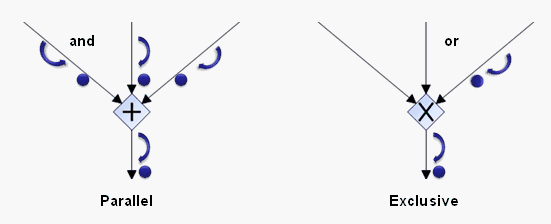 If the gateway is of the Parallel type, one instance must arrive via each of the different sequence flows to be grouped into a single instance which will execute the task.
Managing task outputs
A task can produce a simultaneous execution of different processings. There are basically two output policies:
• A policy of Exclusive type: The instance is directed to one and only one sequence flow among the different possible outputs.
By default, the output policy of a gateway is Exclusive.• A policy of Parallel type: the instance is duplicated and directed to each of the output sequence flows.
In the case of a Parallel gateway, all output branches are processed simultaneously.
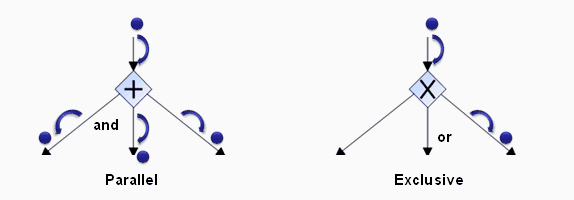
 Although the BPMN standard covers other input and output management policies, only the Exclusive policies are taken into account by the simulator.
Events
BPMN events enable representation of:
• The simulated process start point: this is the point from which processing instances are generated. Nature of these events must be Start or Catching,
• The point marking the end of the simulated process. Nature of these events must be End or Throwing,
• Occurrence of a particular fact that modifies behavior of the current process or another process. Events used in this case are of intermediate nature Catching or Throwing.