Preparing Tests
Supervision of test progress is assured by the lead controller. In the test preparation phase, he/she establishes the work program and assigns activities to controllers.
Work program creation prerequisites
So that the work program can be generated:
• process categories or processes must be connected to the entity
• controls must be connected to process categories/processes
Work program content
HOPEX GRC enables automatic creation of a work program structure from:
• the tree of processes connected to the entity, or
• the processes specified in the test scope
 If no process has been specified in the test scope, all processes connected to the entity will appear in the work program.
|
Environment objects
|
Objects created in the
work program
|
|---|---|
|
Process category or process
|
Test theme
|
|
Control (connected to the process category or process)
|
Test activity
|
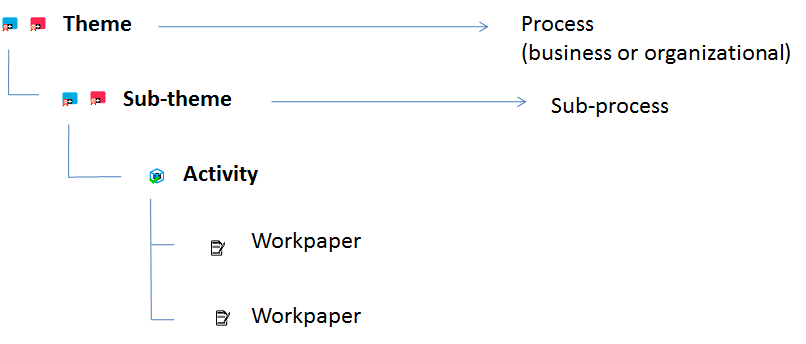
The entity is represented by the test.Test theme
A theme corresponds to a process category or a process.
Themes can be used to group test activities and workpapers, that is to organize test content.
Test activity
A test activity corresponds to a control.
It is the basic element of the test. It enables assignment of responsibility to the controller.
Workpaper
A workpaper comprises points to be checked on a given subject in the course of an audit activity.
A workpaper is generated for each generated test activity. For further details, see Creating workpapers.
Creating work programs automatically
To create a work program automatically:
 Click the test icon and select Generate Work Program.
This is going to duplicate the process category/process tree for the entity within the test scope.
If processes are explicitly specified in the test scope, only these processes are automatically generated in the work program structure.
Completing the work program manually
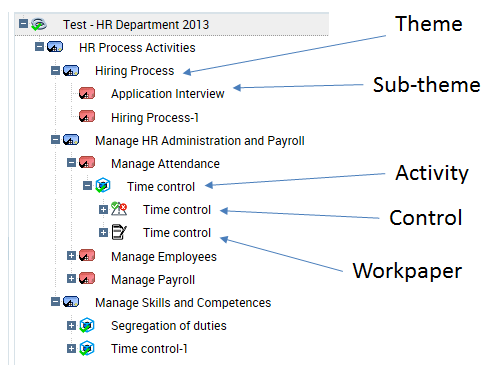
The lead controller can complete the test manually to specify its content. He/she can add or remove themes/activities in the Work Program page the test.
Creating themes
To create a theme:
1. In the properties of a test, select the Work Program page.
2. Click the icon of the test and select New > Test Theme.
The theme created appears in the tree of the work program.
3. Display properties of the theme.
You can:
• modify its name
• select a parent test theme (if you want to create a tree of themes)
• connect the test theme to a process
• enter a comment
4. Click OK.
You can view the tree of themes and sub-themes created. You can now create activities and workpapers.
Creating activities
A test activity is a test element relating to a control.
To create an activity:
1. In the properties of a test, select the Work Program page.
2. Click the icon of the test (or theme) and select New > Test Activity.
The activity created appears in the tree of the work program.
3. Display properties of the activity.
4. Connect the activity to a Theme if you want the activity to be located under a theme in the tree.
5. Connect the test activity to a control.
6. Select the Owner of the test activity, who can be a controller or the lead controller of the current test.
7. Indicate the Estimated Workload.
You can later manually enter the effective workload on this activity.8. Click OK.