ArchiMate Elements
In HOPEX for the ArchiMate Framework, the ArchiMate Elements can be used to enable bridging with other HOPEX EA products and solutions.
These objects come with a specific creation wizard enabling to reuse HOPEX inventory objects or to add new objects to the inventory.
In some cases, the creation wizard will also require additional information that goes beyond the sole ArchiMate® universe purpose. For example, when creating a Work Package, the 'project type' (demand, candidate project, ongoing project) is requested, in accordance to HOPEX Project Portfolio Management requirements.
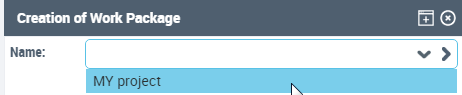
This information is required to enable integration in the HOPEX product universe.
 The right-click menu shows the HOPEX object name instead of the ArchiMate object name. For more details, see "Concepts mapping", page 72.
 To be able to create work packages, the HOPEX Project Portfolio Management module must be imported; since the Work packages are mapped to the Enterprise Project MetaClass from the HOPEX Project Portfolio Management feature, the module is required.
ArchiMate Standalone
The ArchiMate Standalone abstract MetaClass gathers the ArchiMate Elements which are only available as part of an ArchiMate Model.
To add a new ArchiMate specific object, you only need to create a new MetaClass and to define it as a subtype of the ArchiMate Standalone MetaClass.
You may also define it as a subtype of the appropriate ArchiMate Generic MetaModel.For more details, see "Add an ArchiMate Standalone Element", page 68.ArchiMate EA Element
The ArchiMate EA Element abstract MetaClass gathers the ArchiMate element which are also available as a shared inventory both across ArchiMate models and in other HOPEX products, such as Risks, for example.
For more details on the ArchiMate Elements in HOPEX, see "Concepts mapping", page 72.For more details on the creation of an ArchiMate EA Element Type, see "Add an ArchiMate EA Element", page 68.ArchiMate Element relationship
To add a new relationship, you must:
• Create a new relationship MetaClass as a subtype of ArchiMate Concept Relationship, using the appropriate subtypes to defines its relationship category.
• Define the outgoing MetaAssociations as subtypes of the relevant Source / Target relationships.
For more details on the creation of an ArchiMate Element Relationship Type, see "Add an ArchiMate Relationship", page 69.