Accessing HOPEX for the ArchiMate Framework Matrices
HOPEX for the ArchiMate Framework matrices allow you to view the relationships between objects in the repository. Several matrix templates are proposed depending on the type of relationship.
Accessing Matrices with HOPEX for the ArchiMate Framework
To access to HOPEX for the ArchiMate Framework matrices:
1. Click the navigation menu and select Reports > Matrices.
2. Click New button.
3. Select a Matrix Template and click OK.
The new matrix appears in the list.
Specify the content of a matrix with HOPEX for the ArchiMate Framework
To specify the content (called rows and columns) of a matrix:
1. Access to the list of Matrices.
2. Double-click the matrix that interests you.
The matrix content is displayed.
3. Select Add Row.
The Connecting dialog box opens for selection of a target object.
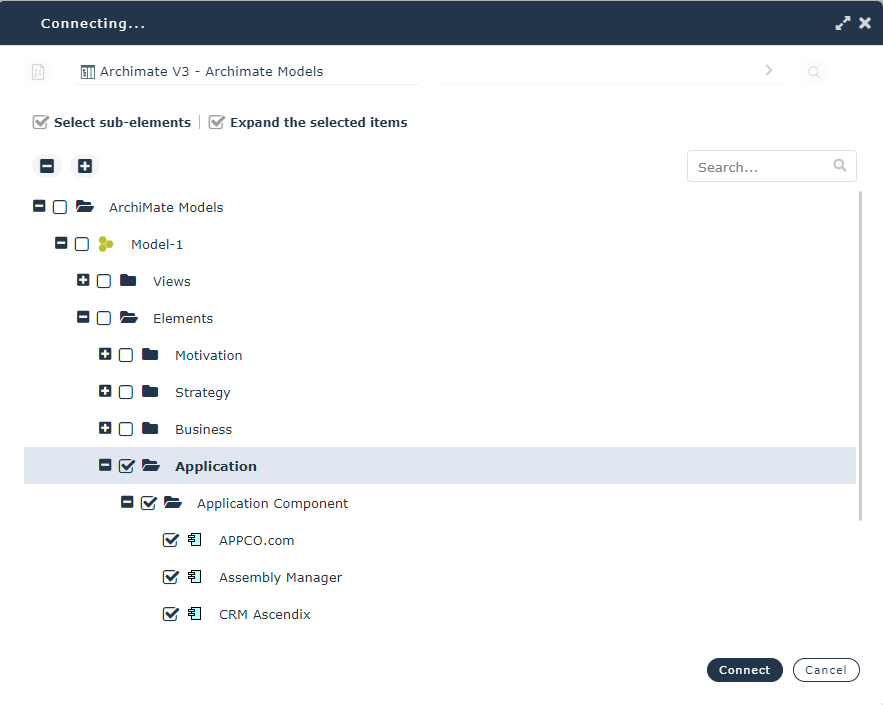
4. Use the Select sub-elements and Expand the selected items boxes to display elements.
5. Select all the objets that interest you and click Connect.
The rows of the matrix are entered.
6. Repeat the procedure for columns (Add Column).
The titles of rows and columns are defined in the matrix.
7. Use the matrix check boxes to create or remove relationships.
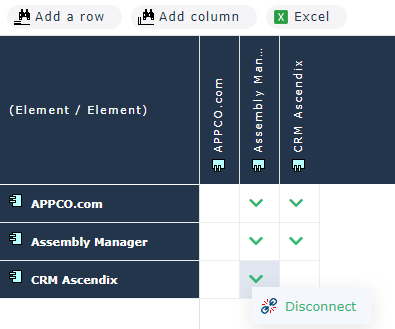
 To export your matrix content to Excel, click the Excel button.