Communication channels
One of the main objectives of city plan is to facilitate changes to the information system by making it possible to modify an application block or add a new block while minimizing the impact on other blocks. For this to occur, it is essential that the communication channels between applications be identified, as well as the type of flows exchanged between them.
The city planning diagram can show these communication channels.
Take the example of the "CPD Channels" city planning diagram which describes the "Functional IS" city plan.
This diagram shows the communication channels identified between the different areas and districts of the enterprise.
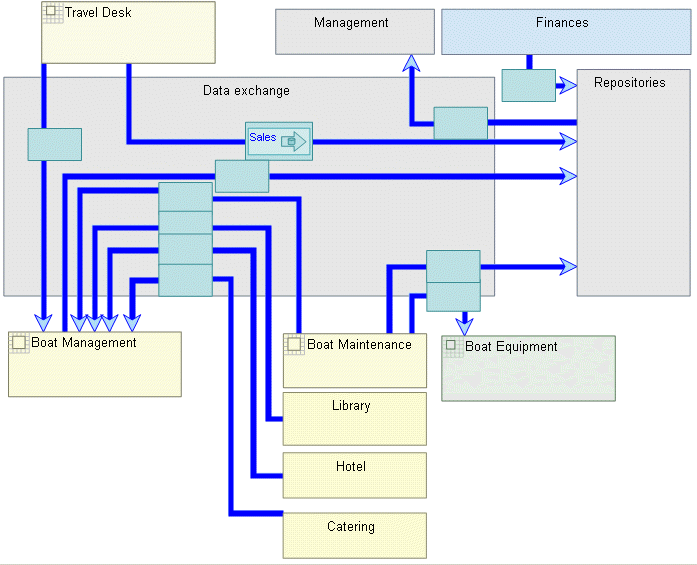
"Channels" city planning diagram
You can directly specify the content of the information carried by each channel in the Exchanged Contents tab of its properties dialog box. These contents correspond to information authorized to transit between two areas. Contents can be added in the channel direction (descending) or in the opposite direction. You can choose to use a single channel by positioning authorized contents in both directions, or to use two different channels for which only contents in descending direction are indicated. The latter solution is graphically clearer but creates more channels between the areas.
The contents indicated can be compared with those effectively carried by the applications in the source area and the channel target. This is achieved by compliance report. See Application System Compliance with City Plan.
These contents can then be displayed in the diagram.
You can display the messages exchanged between the applications contained in each of the city planning areas, districts, or blocks connected by a communication channel.
To display messages exchanged between applications:
1. Right-click the channel and select Shapes and Details.
2. In the Display dialog box, select the Descending messages (Applications) folder.
3. From the Descending messages (Applications) tab specify the messages exchanged by this communication channel that you want to appear in the diagram.
 The messages listed are all the messages exchanged by the applications belonging to the areas, districts, or blocks communicating via this channel.
You can repeat these steps for the ascending messages.
The selected messages are then displayed in the diagram, preceded by an arrow indicating the direction of the flow (ascending or descending).
