Displaying Activities corresponding to Applications
 If you also have MEGA Process BPMN Edition, you can display activities corresponding to applications.
To display activities corresponding to Applications
1. In the diagram toolbar, select Views and Details  .
.
. 2. Select the Business Functions, Activities view.
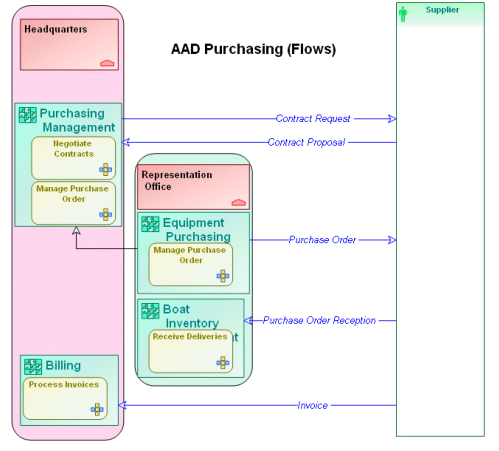
The "Manage Purchase Order" activity is divided between the "Purchasing Management" application at Headquarters and the "Equipment Purchasing" application at the Representation Office.
The "Negotiate Contracts", "Receive Deliveries", and "Process Invoices" activities are handled by the "Purchasing Management", "Boat Inventory Management", and "Billing" applications respectively.
Implementing interactions by activities of a process is described in section Automating Exchanges: Interactions.