Reusing Objects
Certain objects already exist in the MEGA repository.
To reuse in a diagram an org-unit already created:
1. Access the diagram.
2. In the insert toolbar, select Org-Unit  .
.
.3. Click in the diagram where you want to see it appear.
A creation dialog box opens.
4. Enter the name of the org-unit.
The Create button changes to Connect as soon as you enter the last letter of the name of the org-unit already existing in the repository (example: the "Account Manager" org-unit). This change indicates that the org-unit (example: "Account Manager") is known to the system.
 If the button still reads Create, this is because a typing error has prevented recognition of the name entered: an additional or missing letter for example.
 The name is not case-sensitive.
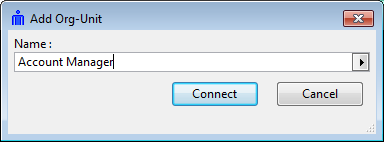
5. Click Connect.
The org-unit now appears in the diagram with all its links existing in the repository..