MEGA Architecture Report Templates
A report template defines the parameters on which a report is based.
Prerequisite:
To display report templates you must have "Advanced" metamodel access.
To configure your metamodel access:
1. Access the Options management window:
• (MEGA Windows Front-End) from the menu bar of your MEGA Architecture desktop, select Tools > Options
• (MEGA Web Front-End) from the Miscellaneous tool group of your MEGA Architecture desktop, select My Account > Options.
2. In the options tree select Repository and check that Metamodel Access option is "Advanced".
3. Click OK.
To access report templates:
1. Access the Utilities navigation window.
2. Expand the Report templates folder.
Report templates specific to MEGA Architecture concern different domains; application architectures, service-oriented architectures (SOA), time constraints acting on the IS, etc.
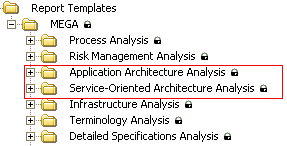
Report templates linked to application architectures:
• Application Functional Analysis: an application functional analysis compares a set of elements providing functions with a set of expected functions (functional scope).
• Application Architecture Management: this report template is dedicated to study of an application architecture management. It provides details of projects and persons involved in this management.
• Infrastructure Compliance: compliance of infrastructures enables analysis of technical infrastructures involved in an information system. For example, this report template can show the usage level of a set of technologies, or compliance of a set of information sub-systems with a technical infrastructure group.
• Deployment: this report template is dedicated to the deployment problem. It provides answers to questions such as "where are applications deployed?" and "what are the differences between an application architecture and one of its deployments?".
• Project Management: this report template describes impact of a set of projects on the information system.
• As Is - To Be Architecture Analysis: this report template provides an As Is - To Be view of application architectures as a function of selected time periods.
Report templates relating to service-oriented architectures:
• Automated Process Supervision: this report template contains indicators and dashboards dedicated to supervision of automated business processes.
• Application Functional Analysis: this report template compares a set of elements providing functions with a set of expected functions (functional scope).
• Business Process Automation: this report template enables detection of potential improvements in information service support of human activities.
• IT Services Attached To Process: this report finds services relating to a set of processes.
See "Service Oriented Architecture (SOA)", page 117.
See "Service Oriented Architecture (SOA)", page 117.
• Impacts of IT Services on Business Processes: modifications to IT services have an impact on the business processes that use them in the context of their implementation. This tool finds all business processes impacted by a set of IT services.
• IT Services Supervision: this report template contains indicators and dashboards dedicated to supervision of IT services and applications.
Analysis Reports
• Time Constraint Analysis: this report template enables representation and modification of time constraints between selected objects.
• Varied Object Analysis: this report template details variations from given varied objects.
• Variant Object Analysis
• Variation Analysis: this report template enables detailing of varied objects, variants and linked variations from given variations.
For more information on variations, see the MEGA Common Features guide.
These report templates allow you to create reports with predefined parameters.
 For more details on reports, see the MEGA Common Features guide, "Generating Documentation".To create your own report templates, see the HOPEX Studio guide.