Merging IT-Pedia Technologies With Existing Technologies of Your Repository
Your repository may contain technologies created outside of the IT-Pedia import. These technologies do not benefit from the provider data and updates supplied by the IT-Pedia connector, such as official life cycle dates, for example. To keep the data for these technologies while benefiting from IT-Pedia information, you can merge it with the IT-Pedia technologies that you import HOPEX IT Portfolio Management.
Merging two technologies
To merge two technologies:
1. Click the Technologie navigation menu.
2. In the edit area, select the technologies to merge.
3. In the menu bar of the list, click More  > Merge technologies.
> Merge technologies.
4. In the wizard that appears, enter:
• The source technology, which will be merged in the target technology
• The target technology, which will include information of the source technology.
5. Click Next.
6. Select the properties you want to keep from the source and target technologies. By default, properties of the target technology are selected.
7. In the same way, select the links you want to keep.
8. Click OK.
Technology Automatic Updating and Alerts
Automatic update checks, at a given frequency, if the properties of software technologies imported into HOPEX have changed in the IT-Pedia repository and updates the corresponding technologies in HOPEX.
Defining Update Frequency
To activate an automatic update, you must create a trigger in the administration tool which implements the IT-Pedia Automatic Update macro.
A Trigger is based on a Trigger Definition. This definition consists of a job which includes the macro that the Trigger will execute.
To create the trigger definition:
1. Open the Administration module.
2. Open the environment.
3. Expand the repository folder concerned.
4. Right-click Scheduler and select Manage Triggers.
5. Click the Triggers Definitions tab.
6. Click the New button.
The trigger definition wizard appears.
7. Enter a name, for example: "Automated IT-Pedia Update".
8. In the System Job Definition field, select > Create System Job Definition.
The Job definition wizard appears.
9. Enter a name for the Job, for example "Automated IT-Pedia Update - System Job".
10. In the Implementation field, select > Connect Macro.
11. Look for the macro entitled "IT Pedia V2 - Module - Update Software Technologies From MyProducts - Scheduler Job".
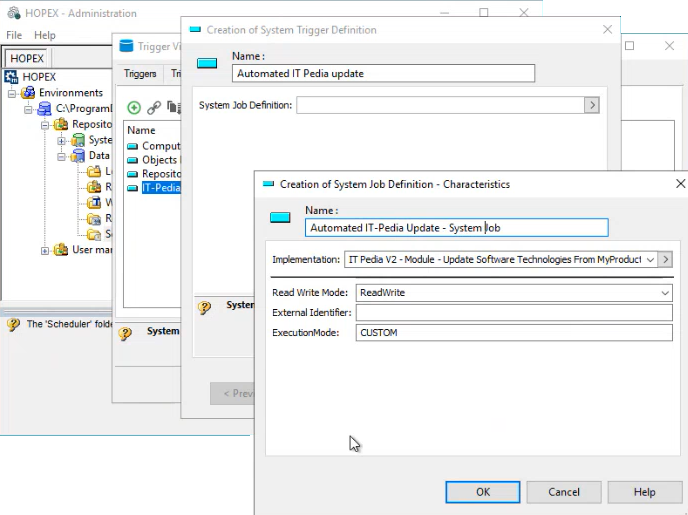
12. Click OK.
13. Back in the trigger fefinition wizard, click Next.
14. Define a schedule, e.g., each saturday at 2:00:00.
 For more information on trigger scheduling, see Configuring the Trigger Scheduling.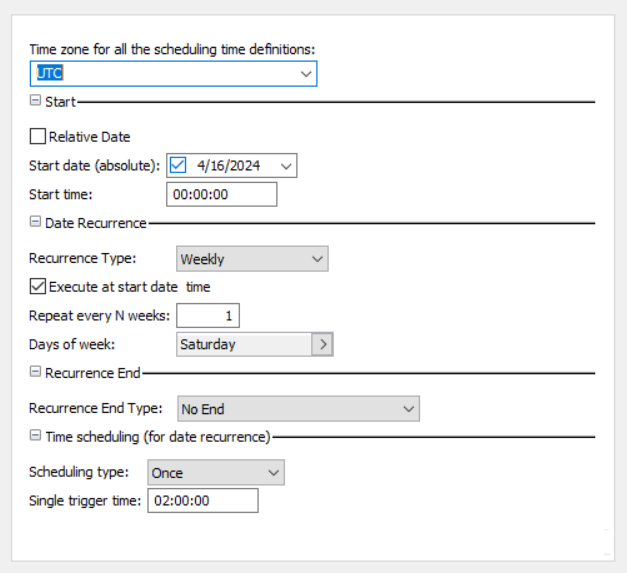
15. Click Finish.
To create a trigger:
1. In the Trigger Viewer window, click the Triggers tab.
2. Click the New button.
3. Select a trigger definition, e.g. "Automated IT-Pedia Update".
4. Give the trigger a name, e.g. "Automated IT-Pedia Update - Trigger".
5. Exit the administration module.
Subscribing to Alerts
A user can be notified of updates made on the technologies he is in charge of.
To subscribe to an alert:
1. In the edit window, display the list of technologies.
2. Select the technology concerned and click the Follow  button.
button.For more details on alerts, see Managing Your Alerts on Object Modification.Support Alert Report
A Support Alert MetaAtribute available on each technology compares the technology life cycle (imported from IT-Pedia or defined manually) with its life cycle in the organization.
For more information on technology life, see Defining Technology Life.A report uses the Support Alert MetaAttribute to analyze technologies in the HOPEX repository and displays all possible conflicts between the use of these technologies in the organization and their official life cycles.