Generating the Business Capability Map of a Portfolio
HOPEX IT Portfolio Management enables you to generate a business capability map in the form of a report that reflects the functional coverage of an application portfolio.
To generate a Business Capability Map from an application portfolio:
1. Display the portfolio properties.
2. Click the page Reporting > Business Capability Map Breakdown.
The report positions the portfolio applications in the areas that represent business capabilities. It therefore reflects the functional coverage of portfolio applications.
 For more details on capability maps, see Defining Business Capabilities.
Report parameters
This consists of defining report input data.
|
Parameter
|
Parameter object
|
Comment
|
|---|---|---|
|
Business capability
|
Business capability / Business capability Map
|
One object mandatory.
|
|
In-depth research of the application in portfolios and sub-portfolios.
|
|
This option displays the applications defined in the sub-portfolios of the portfolio to which the report relates.
|
|
Characteristics
|
Evaluation criteria
See Defining Portfolio Assessment Criteria. |
Displays in the report the application evaluation results for the selected characteristics:
- Technology compliance
- Cost
- Technical efficiency
- Etc.
Select the form in which you want to display a characteristic: graphic element or highlighting of the application concerned by the characteristic.
|
Example of a business capability map example
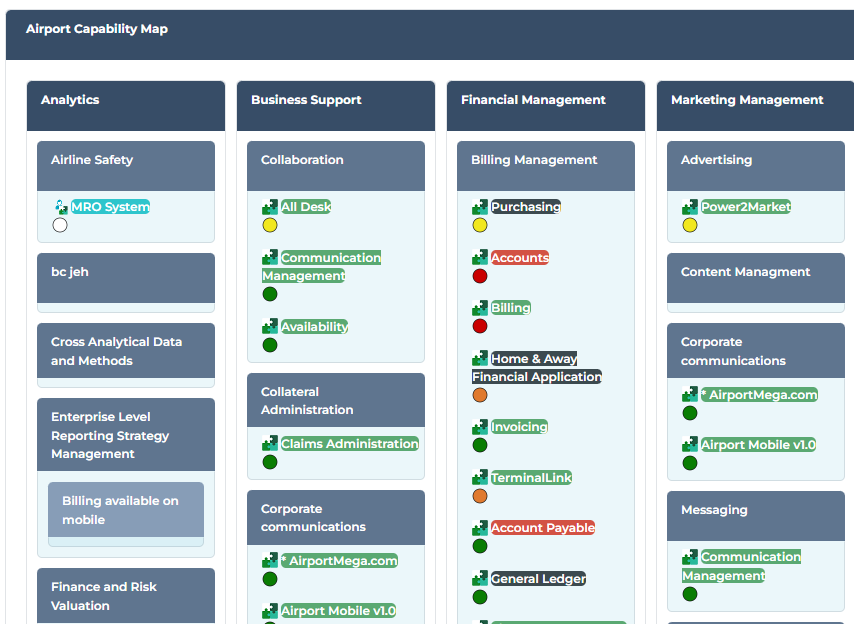
You also have the Business Capability Breakdown Time Report that shows the evolution of the functional coverage of an application landscape over time.
See also Portfolio Analysis Reports.