Accessing the Report DataSet Definitions
You can access:
• all Report DataSet Definitions (provided and custom)
 They are displayed as a tree.
You can display all the Report DataSet Definitions in:
• the Edit area, especially to work with a specific Report DataSet Definition
• the Browse area, so as to keep a global view of all the Report DataSet Definitions in the Browse area while displaying the properties of one of them in the Edit area.
• custom Report DataSet Definitions only
They are displayed as a list.Custom Report DataSet Definitions are the Report DataSet Definitions not provided with HOPEX.
Accessing all the Report DataSet Definitions
To access the Report DataSet Definitions:
1. Connect to HOPEX Report Studio desktop.
2. From the navigation menus, click Report Definitions > Data Source Definitions.
Click Report Definitions > Data Source Definitions  to display the tree in the Browse area.
The tree displays:
• HOPEX folder, which includes the Report DataSet Definitions provided with HOPEX and sorted in topic folders.
• all the custom Report DataSet Definitions
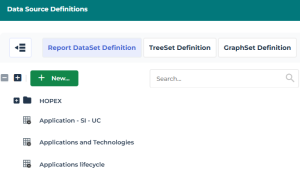
3. (If needed) Use the Search field to access a specific Report DataSet Definition.
Click the Report DataSet Definition, to display its properties.Accessing the custom Report DataSet Definitions
Custom Report DataSet Definitions are the Report DataSet Definitions not provided with HOPEX.
You can access the list of:
• all the custom Report DataSet Definitions
• only your custom Report DataSet Definitions
Note that when you customize a Report DataSet Definition provided with HOPEX, it becomes a Custom Report DataSet Definition, see How to Modify a Report DataSet Definition Provided with HOPEX.To access the custom Report DataSet Definitions:
1. Connect to HOPEX Report Studio desktop.
2. In the homepage, My Scope part, to display:
• your custom Report DataSet Definitions only: in My Work, click My Report DataSet Definitions indicator
• all custom Report DataSet Definitions: in Customizations, click Custom Report DataSet Definitions indicator
The corresponding list of custom Report DataSet Definitions displays.
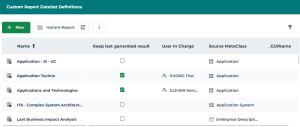
3. (If needed) Use the list filtering tool to access a specific custom Report DataSet Definition.
 You can sort or filter by Source MetaClass or by User in Charge (for all custom Report DataSet Definitions).Click the custom Report DataSet Definition, to display its properties.