Specifying Text Language (Multilingual Context)
You can edit texts in several languages.
Text editing conditions
To specify in which language text will be edited:
1. From the descriptor, right-click the text and select Properties.
2. Select the Language tab.
By default, a text is executed in all languages.
3. Select or remove one or several of the environment languages.
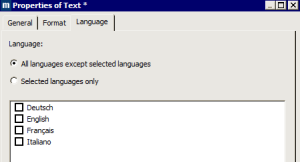
4. To restrict or extend the choice of languages, you can:
• specify the languages you want (Selected languages only option).
• exclude unwanted languages (All languages except selected languages option).
In the descriptor menu tree, the languages applied to text are indicated alongside its icon. "*" indicates that all languages have been selected.

 If you edit the same text in several languages, it can be useful to provide a text with the property All languages except. If you add languages at a later stage, all the languages can thus be processed without the risk of any being forgotten.
Data derived exclusively from MEGA
When you edit texts that contain HOPEX data exclusively (not texts that you yourself have entered), it is of no great value to duplicate these texts for each language.
Example: enter <&Name&> to edit the name in the current language (which is not the case if you enter "&Name (English)&").

 See also Showing Metamodel Names.