Implementing scheduled transitions
Workflow transitions can be triggered on a given date without user intervention.
Example: a workflow transition can be triggered if the workflow remains in the same status for more than ten days.
The triggering date can be relative to a reference date, for example the triggering date of a workflow transition or instancing of a workflow.
Example: a reminder is sent one week after passage to a particular workflow status.
To define a transition with relative triggering date:
1. In the dialog box of creation of an action, select "Scheduled" execution kind.
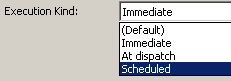
2. Click Next.
3. In the Reference Date field, two macros are proposed:
• "Reference date from Subject property"
Macro configuration text can be specified as follows:
[SchedulingDate]
MetaAttribute = [Planned End Date]
 Configuration data entry help is available. To do this, enter the character "[" then simultaneously press keys Ctrl + Space.
• "Reference date is transition triggering"
This macro does not require additional configuration, since it takes the transition triggering date as reference date.4. In the Start section, specify recurrence conditions and hourly planning.