Visio Import Example
As an example of a drawing to be imported, take the simple flow diagram "Vehicle Breakdown Analysis", which describes steps in vehicle repair.
Visio Diagram
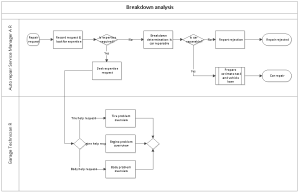
This diagram can be reproduced as the diagram of an organization process in HOPEX.
Result in HOPEX
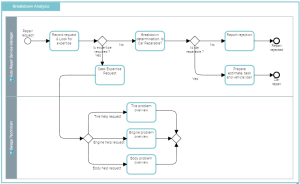
Example of Masters and corresponding MetaClasses
Master (VISIO) | MetaClass (HOPEX) |
|---|---|
Page | Organizational Process |
Decision | Gateway |
Dynamic Connector | Sequence flow |
Process | Operation |
Start/End | Event |
Subprocess | Organizational Process |
Swimlane | Participant |
Once you have mapped the Visio Masters with the HOPEX MetaClasses, you can define the properties of the related shapes (MetaClass instances).
Example of Shape Properties
Visio Shape and corresponding HOPEX MetaClass | Property |
|---|---|
If Decision = Gateway | Gateway type: exclusive, inclusive, parallel, etc. |
If Start/End = Event | Event category: end, start, timer, etc. |
If Swimlane = Participant | Participant assignment (target MetaClass) |
In the example, the "Decision" master, which corresponds to the "Gateway" MetaClass in HOPEX, has four occurrences in the diagram.
In the Attribute/Link column associated with each occurrence, you can define the type of gateway to create in HOPEX (exclusive, inclusive, parallel, etc.).
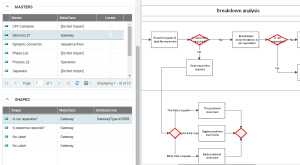
As for the "Swimlane" master which correspond to participants, you can define the type of object to connect to each participant (Application, Org-Unit, etc.) and even connect a HOPEX object to a participant.
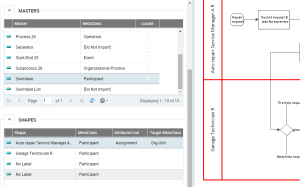
To connect an Org-Unit to a participant:
• In the Visio import wizard, select the shape corresponding to the participant, for example "Garage Technician".
• In the Attribute/Link column, select "Assignment".
• In the TargetMetaClass, select "Org-Unit".
If the "Garage Technician" Org-Unit already exists in HOPEX, the import wizard does not recreate it but connects it to the participant. If it does not exist in HOPEX, the import wizard creates the corresponding Org-Unit while connecting it to the participant.