OV-4 Operational Scenario Diagram
You can create an operational for an organization to describe how operational participants (internal participants of this organization) exchange resource flows for this specific scenario.
To create an operational flow for an organization:
1. In the navigation bar click Operational Viewpoint >OV-4 Organizational Relationships Chart > Organizations.
2. Right-click an organization and select New > Scenario of operational flows.
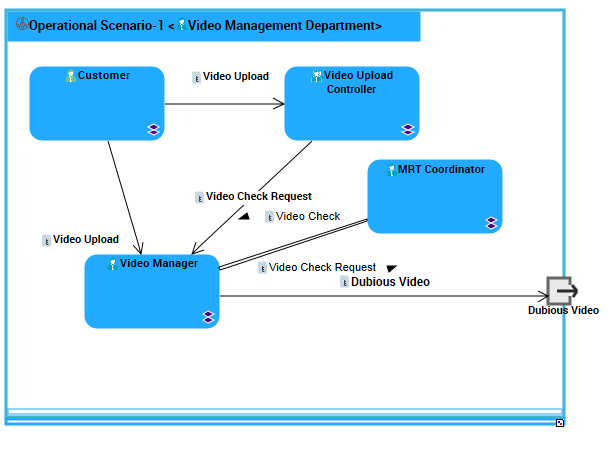
Example of Operational Scenario Diagram
Scenario of Operational Environment Diagram
You can create a scenario of operational environment to describe the external use of an organization. You can specify:
• organization/position type participants
• organization partner participants
• resource flows exchanged
To create operational environment scenario diagram:
1. In the navigation bar click Operational Viewpoint > OV-4 Organizational Relationships Chart > Organization Environments.
2. Right-click and organization environment and select Scenario of Operational Environment.
Organization Environment Diagram
To create on organization environment diagram:
1. In the navigation bar click Operational Viewpoint > OV-4 Organizational Relationships Chart > Organization Environments.
2. Right-click an environment and select New > Organization Environment Diagram.
This diagram enables you to display partner organizations and their interactions as well as position types.

Organizational Unit Structure Diagram
To create an organizational unit structure diagram:
1. In the navigation bar click Operational Viewpoint >OV-4 Organizational Relationships Chart > Organizations.
2. Right-click an organizaton and select New Organizational Unit Structure Diagram.
You can insert the following objects in this diagram:
• Org-Unit component
• Position-Type component
• Interactions and endpoints
Organizational Unit Tree Diagram
HOPEX DoDAF offers you the possibility to view and draw organization composition tree diagrams.
To create an organization structure diagram:
1. In the navigation bar click Operational Viewpoint >OV-4 Organizational Relationships Chart > Organizations.
2. Right-click an organizaton and select New Organizational Unit Tree Diagram.
You can insert the following objects in this diagram:
• Organizations
• Position Types