Compulsory Actions to Define a User Group
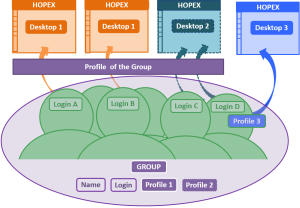
To create a user group and allow the persons belonging to this group to connect to HOPEX you must:
• define the name of the person group
 The login of the person group is automatically created at creation of the person group.
  The login of the person group is used for configuration purposes only. A person belonging to a group connects with his/her own login.
 • assign a profile to the person group
The person group must have at least one profile assigned for the persons belonging to the group to connect to HOPEX.When a person belongs to a person group, the person cumulates the profiles assigned to him/her to the profiles assigned to the person group. See also the authentication in the case of a person group, Managing an SSO Authentication Group.