Option Inheritance
Option levels are governed by an inheritance mechanism. An option inherits the value defined at higher level:
• A user inherits the option values defined at connection profile level.
• A profile inherits the option values defined at environment level.
• An environment inherits options defined at site level.
Customizations made at the user level are of highest priority, followed in order of priority by those made at the profile and the environment levels.
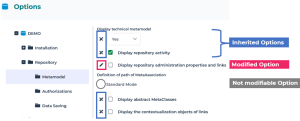
The icon located opposite the option indicates the inheritance, or not, from the higher level:
•  indicates the inheritance from the higher level.
indicates the inheritance from the higher level.•  indicates that the inherited option value has been modified. The value is no longer inherited from the higher level.
indicates that the inherited option value has been modified. The value is no longer inherited from the higher level.• options without icons indicate that the option value cannot be modified at this level.
In this example of a Solution Desktop, the first option value is modified, the following two ones are inherited and the last one cannot be modified at this level.
Modifying an option value
To modify the value of an option inherited from a higher level:
1. Access the Options page.
 See Modifying Options.
2. Modify the value of the option concerned.
The icon  indicates that the option value is modified.
indicates that the option value is modified.Resetting an option value
To reset the value of an option:
1. Access the options.
See Modifying Options.2. Click  .
.
.The option value is reset and the icon changes to  .
.
.Controlling the modification of options
With HOPEX Administration(Windows Front-End) you can prohibit modification of any option at a lower level than your current level.
Example: if you open options of the environment, you can prohibit modification of all options at user level.