Accessing the Management Page for Workspaces
To access the list of current workspaces in an environment:
1. Connect to the HOPEX Administration desktop.
2. Click the Repository navigation menu and select Workspaces.
The management page for workspaces currently in progress in the environment appears.
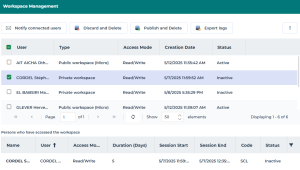
The management page for workspaces currently in progress details the following for each workspace:
 To sort workspaces according to a column, click the header of the corresponding column.
 You can also arrange columns in the order you want. To do this, click the header of the column to be moved and, holding down the mouse button, move it to the required position.
• the User of the workspace
• the Type of workspace:
• "Private Workspace":
The user can modify data. His/her updates are kept in his/her private workspace until dispatched.
• "Public Workspace (micro)":
The user can modify data. As soon as he/she saves his/her updates, they are visible to other users.
The user sees the updates of other users, as their updates progress.
• the Access Mode of the workspace, for example:
• "Read/Write" when a session is open.
• "Read-only" when the user is in consultation only.
• no value, if the private workspace is passive (the user has saved his/her session but is not currently connected to HOPEX).
• no value if the user is in offline mode
• the Creation date of the workspace
• the Status of the workspace
• active
• inactive (for a private workspace)
The Persons who have accessed the workspace frame details:
• the User of the workspace
• the Access Mode of the workspace, for example:
• its Duration in days
• the start date and time of the last session
• the end date and time of the last session
• the user Code
• the user Status
• active
• inactive