Prerequisites for the use of automatic translation
For the commands linked to the automatic translation of data to be available, you must have acquired a Microsoft Translator Text API license.
 For further details about this license, see https://azure.microsoft.com/en-us/services/cognitive-services/translator-text-api/.
 To use this service, your IT architecture must allow the HOPEX servers to access the URL https://api.cognitive.microsoft.com/.
The API key of your Microsoft Translator Text API license must be declared and, if your API key is region-dependent, the region to which this key belongs must also be declared.
An option enables an administrator to enter the Authentication key number and its region, enabling activation of the automatic translation APIs.
To activate this option:
1. Connect to HOPEX Administration desktop.
2. Click the Environment Options navigation menu.
3. In the Options tree, select Installation > Machine Translation.
4. In Authentication key field paste your API key.
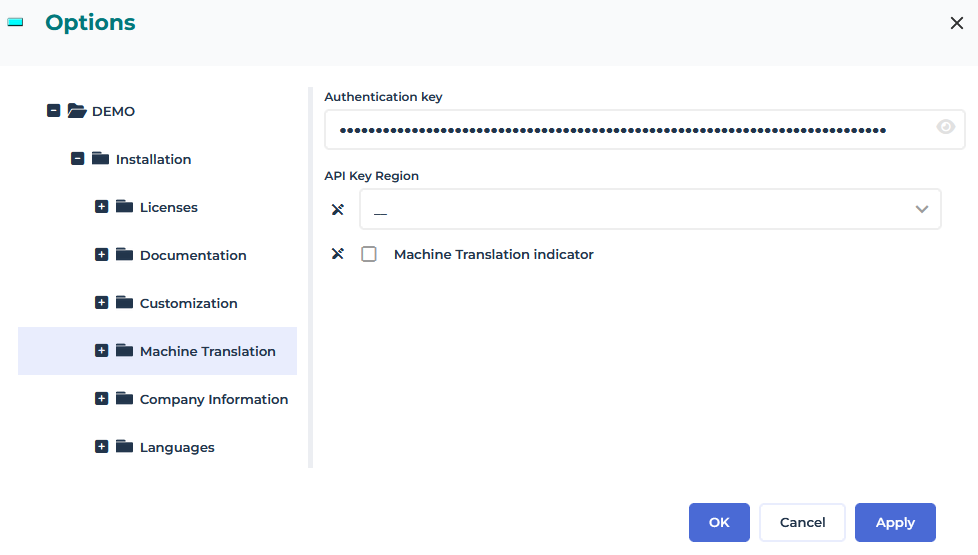
5. If your API key is region-dependent, select the API Key Region.
6. If you want to indicate that the translation was done automatically, select the Machine Translation indicator option.
A note is displayed at the end of each translated text.