Reorganizing an RDBMS Repository
You can reorganize a repository when you want to change the storage type.
E.g.: from an Oracle repository to an SQL Server repository.
Before reorganizing a repository, you must check that there is no other active or passive private workspace on this repository, see Workspace Administration.
The reorganization process of an RDBMS repository is automated and consists in:
1. A logical backup of the repository, to get the command file which contains creation orders of repository objects and their links.
2. A repository initialization.
3. A repository restore by import of the command file in an empty repository.
Reorganizing a repository
 To improve reorganization times and HOPEX performance, remember to delete old log elements before repository reorganization.
When reorganizing a repository, you can choose to:
• delete log (by default)
• keep the entire log or only part of it (keep the most recent log elements)
 Depending on its size, the log import might be very long (several days)
You can select Import the logfile a posteriori. Thus, the log is not automatically imported at reorganizing. You must import it manually at a suitable date.
To reorganize a repository:
1. Connect to HOPEX Administration and select the repository concerned.
2. Right-click the repository concerned and select Reorganize.
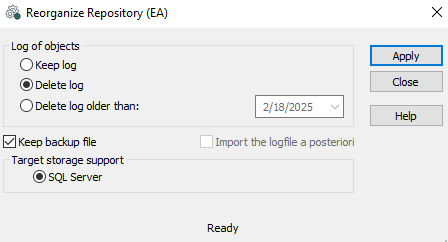
3. (Optional) In the Log of objects frame, you can select the actions to be executed on the log at reorganization.
4. (Optional, if you chose to keep the log or part of it) Select Import the logfile a posteriori to perform the import later.
 The logfile is saved in the work folder WORK of the repository, in format: Bkp_<YYYY-MM-dd_HH.mm.ss>_<repository name>-logs.mgr. To import it see Importing command files.
5. (Optional) If you do not want to keep the repository log, clear Keep backup file.
The backup file is generated in the work folder WORK of the repository, in format: Bkp_<YYYY-MM-dd_HH.mm.ss>_<repository name>.mgr6. Click Apply.
When the repository has been reorganized, a message indicates that the reorganization is completed.