Managing the Cache in RDBMS Environments
The RDBMS local cache avoid multiple requests when multiple users are on the same repository view. Access for the following users is speed up.
By default the RDBMS local cache is activated on all the repositories:
• You must configure your anti-virus accordingly.

• You can increase RDBMS cache size (memory).
Increasing RDBMS cache size (memory)
With repositories including a large amount of objects, we advise you to increase the size of RDBMS caches. The larger your cache space, the fewer the network exchanges and the better your HOPEX performance.
To increase cache size:
1. Connect to HOPEX Administration.
2. Right-click the environment and select Options > Modify.
3. In the environment options, select Options > Installation > Advanced.
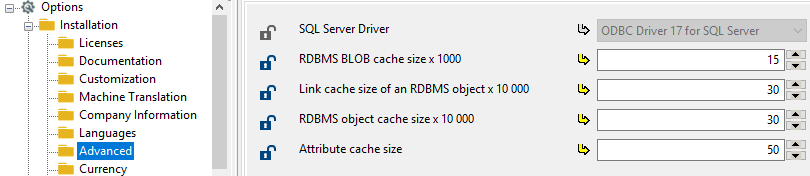
4. Increase cache sizes according to your memory space.