Tips on Using Writing Access Areas
Common data
MEGA recommends that you manage data common to several projects in a specific project. This simplifies control of their evolutions.
Tips
MEGA recommends:
• definition of certain users:
• with writing access area level higher than projects so as to manage conflicts between projects, for example "Project Management".
• with writing access area at creation at the level of the project, to avoid creation of objects that cannot be modified by the project.
• that only the "Administrator" user should be connected to the "Administrator" writing access area.
• that if a person produces on several projects, the person should have one HOPEX user per project.
Objects are therefore directly created in the correct owner project, greatly simplifying management.
Typical example
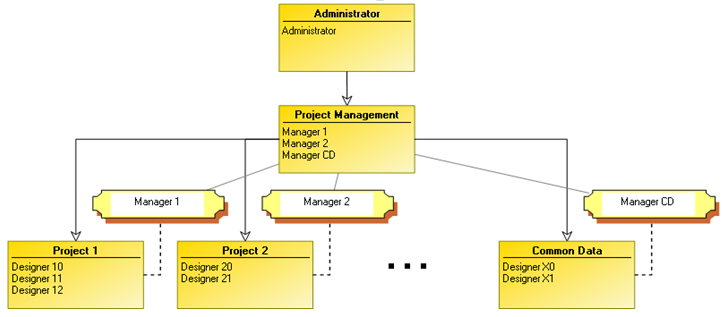
The following example presents a typical case of writing access area use:
• Only the Administrator user has "Administrator" writing access area level.
• All managers can modify objects of all projects.
• Objects created by a manager are attached to a dedicated project.
 Manager 1 can modify objects of all projects, by default the objects he/she creates are in project 1.
• Data common to different projects ("Common Data") is managed in a dedicated project with a specific writing access area.