Creating a Writing Access Area
To create a writing access area:
1. In the diagram insert toolbar, click Writing Access Area  then click in the diagram.
then click in the diagram.2. Enter the name of the writing access area.
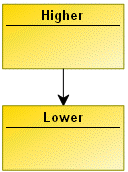
Dependency of writing access areas is determined by creation of a "lower" link which starts from the higher writing access area to the lower writing access area.
Defining Writing Access Area Persons or Person Groups
To define persons or person groups of a writing access area:
1. From HOPEX Administration, open the writing access diagram.
2. Right-click the writing access area and select Properties.
3. Select the Users tab and click Connect.
4. In the query tool, click the arrow in the first field and select the target (Access Area Member, Person or Person Group).
5. (optional) In the second field, enter the character string to be queried.
6. Click Find  .
.
.7. In the results list, select the required access area member and click Connect.
 Press the [CTRL] key to select several members simultaneously.
The person or person group you have connected appears in the list of access area members of the selected writing access area.