Processing Activities Overview
Additional information to specify
The property page of a processing activity displays general information about the processing activity:
• Processing Activity Name
• ID: identifier
 The identifier is automatically computed based on the acronyms of the associated legal entity and department.
• Processing Activity Purpose: enables you to enter free text to describe the purpose of the processing activity
• Data Protection Role: enables you to specify the role played by the legal entity
• "Data Controller"
It is mandatory to specify a data controller.• "Data Processor"
• "Joint Controller"
 Joint controllers are data controllers who jointly determine the purposes and means of a processing activity.
• Processing Activity Owner
• Description: enter a comment
• Sensitive activities: specify any particular operation carried out in the context of this processing activity that could impact the final risk level.
For more information, see Defining Sensitive Activities.• Start Date and End Date
• IT Processing / Paper Processing: specify whether the processing activity uses automated or paper means or both
• Persons in charge of processing: enter manually the actual people in charge
Information in read-only mode
Some fields are automatically filled in (they are in read-only mode only):
• Legal Entity
• Department
• DPO
The DPO is defined at the legal entity level.• DPO deputy
The DPO deputy is defined at the department level.• National representative
This field provides information on the level of coverage of the European countries. For more information, see Managing National Representatives.• "Full": all representatives for all EU countries have been assigned.
• "Partial": at least one national representative covering at least one EU country has been assigned.
• "No": no representative has been assigned so far
• "N/A": the legal entity is located in the EU; it is not necessary to specify national representatives.
Participants involved in the processing activity
You can specify which other participants are allowed to take part in the processing activity.
To specify additional participants:
1. In the processing activity property page, unfold the Other participants section at the bottom of the page.
2. Connect:
• Legal Entities
• Departments
Note that by default the following entities and departments are automatically granted access:• The legal entity and the main department defined in the processing activity Overview page.
• All legal entities appearing in the processing activity Details page, under the Processing Element table.
Computed information
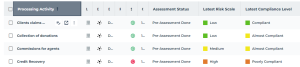
The columns of the list of processing activities display computed information based on assessments (whether pre-assessments or DPIAs) such as:
• the Assessment status: indicates whether an assessment has be performed or not
• Latest risk scale
• Latest compliance level
If no assessments have been performed, the cells remain empty.