Viewing the DPO Organizational Chart
In HOPEX Privacy Management, the DPO organizational chart shows the DPOs hierarchy of the organization and defines who is reporting to whom in the organization.
This helps escalating problems and quickly identify the responsible person when dealing with compliance matters.
To access the DPO organizational chart:
 Select Organization > DPO Organigram Report.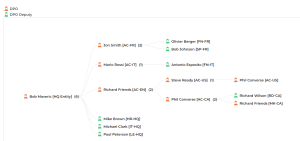
To define a DPO organigram report if it is not already available:
1. Select Legal Entities & DPOs.
2. Select a legal entity and in its property page, fill in the following fields:
• DPO
• Reporting to DPO: enables you to specify dependencies and populate the DPO organizational chart accordingly.