About HOPEX Privacy Management Import and HOPEX Integration
How can I reuse information from other HOPEX solutions?
HOPEX Privacy Management enables you to:
• import applications and processes
• reuse them to create processing activities
 For more information, see Creating Processing Activities through Duplication.
• view application/process properties and associated diagrams directly from HOPEX Privacy Management.
I cannot manage to drag-and-drop a sub-process under a department. What's wrong?
It is possible to drag-and-drop sub-processes to create a processing activity but there is a specific rule for it:
When you drag a sub-process under a department, it actually drops the parent process (not the sub-process).
Let's take an example to better illustrate the case. Let's assume that:
- there are 3 sub-processes under a process in the left tree.
- you drag-and-drop one of these sub-processes under a department in the right tree.
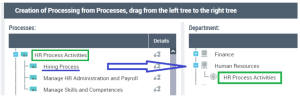
In the above example, "Hiring Process" gives birth to "HR Process Activities".
Now you want to drag-and drop another sub-process under another department. In our example, you might want to drop "Manage Skills and Competences" under "Finance".
-> You get an error message stating: "the sub-process cannot generate a processing as it is already connected to a processing".
Miscellaneous
Is it possible to view the diagram of an imported process?
Yes, you can if the process has been imported together with the diagram.
To do so:
1. Select ROPA.
2. Open the processing activity property page.
3. Click the Details tab then Details View.
Next to the processing activity/sub-processing concerned, a button enabling you to display the diagram is made available.
You can also access the static web site of the process if it has been imported in HOPEX Privacy Management.My DPO organizational chart is empty. What should I do?
You can draw the DPO organizational chart by specifying the hierarchy of DPOs in the entity property pages.
See Defining Legal Entity Properties. You must fill in the DPO and Reporting to DPO fields so that the organizational chart could be automatically generated.
I cannot create legal entities. What should I do?
Only the Privacy functional administrator can create legal entities or departments.
Make sure you are connected with the appropriate profile.