Building the Business Capability Map
A business capability map is used to represent the main business capabilities that interact with an enterprise.
Creating a business capability map
To create a business capability map:
1. In the Business navigation menu, click Capabilities.
The business capability map tree appears.
2. Click New.
3. Specify the Name and click OK.
4. Specify an Owner (library, enterprise, etc.).
The new business capability map appears in the list.
Creating a business capability decomposition tree
A Business Capability Decomposition Tree is a diagram that describes the tree structure of a business capability or a business capability map. Focusing on a particular business capability, this type of diagram enables summary representation of business capability breakdown into sub-business capabilities.
To create a business capability map diagram:
1. Click the business capability map to open its properties.
2. From the Diagrams page, click Create a diagram.
3. Hover the mouse over Capability decomposition and click Create this diagram.
The frame of the business capability map described appears in the diagram.
You can build a hierarchical view of the business capabilities that interest you.
Creating a capability structure diagram
A capability structure diagram is a capability map diagram which represents:
• the main business capabilities interacting within the enterprise
• dependency links between business capabilities.
For example, the business capability that consists of managing operations is broken down into a number of business capabilities such as: “Handle customer complaints”, “Manage travel reservations”.
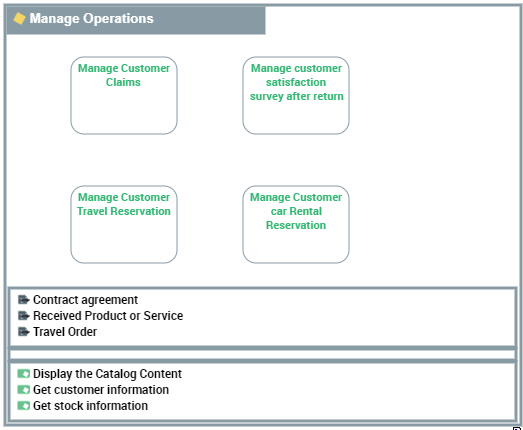
To create a capability structure diagram:
1. Click the business capability map to open its properties.
2. In the Diagrams page, click Create a diagram.
3. Hover the mouse over Capability structure and click Create this diagram.
The frame of the business capability map described appears in the diagram.
You can construct this diagram in tabular entry mode.
 For more details on the use of tabular input, see Diagrams in Tabular Entry Mode.
 Defining capabilities in a capability diagram
To add a business capability to a business capability map diagram:
1. In the diagram Insert toolbar, click Capability.
2. Click in the frame of the business capability map.
3. In th add dialog box, select or search for a capability and click Create.
The capability appears in the diagram.
If the business capability is associated with functionalities, they also appear. For more details on the capabilities and functionalities associated with business capabilities, see Defining business skills and functionalities associated with capabilities.Defining business capability dependencies
A dependency link between a capability and another is used to specify the elements on which this dependency is based.
A single capability can have more than one dependency within a single diagram.To create dependency links between two business capabilities:
1. In the Insert toolbar, click Business Capability Dependency.
2. Click the user capability, and keeping the left mouse button pressed, move the cursor to the capability used.
3. Release the mouse button.
The business capability appears in the diagram.