Attributes
Entities and associations can be characterized by attributes.
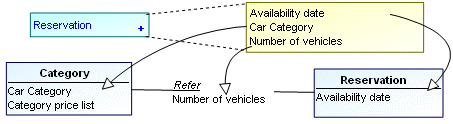
These attributes can be found by studying the content of messages circulating within the enterprise.
 An attribute is a named property of a class.
Examples:
• "Client Name" (property of the client entity).
• “Client No.” (identifier of the client entity).
• “Account Balance” (property of the account entity).
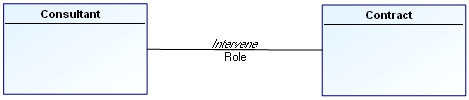
An attribute characterizes an association when the attribute depends on all the entities participating in the association.
In the diagram below, the role that a “Consultant” plays in a “Contract” depends on the consultant and on the contract, and therefore on the “Intervene” association.
Creating attributes
To create an attribute on an entity:
1. Right-click the entity and select Properties.
The entity properties dialog box opens.
2. Click the drop-down list then Attributes.
The Attributes page appears.
3. Click the New button.
A default name is automatically proposed for the new attribute. You can modify this name.
4. Click OK.
You can specify its Data type.
Example: Numeric value.
 See Data Types and Column Datatypes for more details on data types that can be assigned to an attribute.
Inherited attributes
When a generalization exists between a general entity and a more specialized entity, the specialized entity inherits the attributes of the general entity.
See Generalizations.