Concept life cycle structure diagram
The concept life cycle structure diagram is used to describe a concept life cycle.
For example, a "Person" becomes visible in a media library after "Registration". It can be registered with state "Child", "Adolescent", "Adult" or "Senior". Passage from one state to another can be connected to a event, a "Birthday" for example.
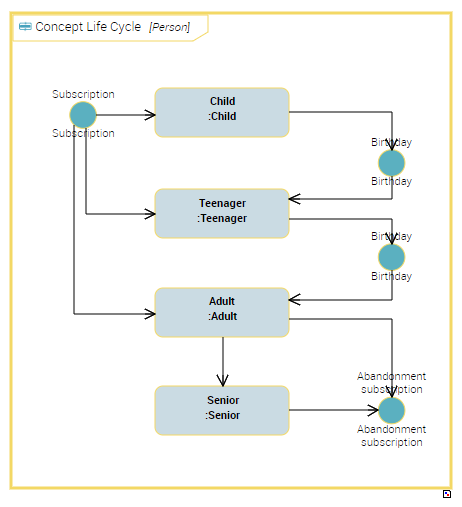
A concept life cycle structure diagram includes the following elements:
• Concept Life Cycle Phases, which are connected to state concepts of the"Person" concept
 A state concept is a situation in a concept life cycle during which it satisfies certain conditions, executes a certain activity or waits for a concept event. A state concept represents a time interval of which limits are two concept events. A state concept is a phase through which the concept passes during its life cycle.
 For more details on state concepts, see Describing State Concepts
• Concept Life Cycle Events, which are connected to event concepts of the"Person" concept
An event concept represents an event occurring during concept life, for example a change of season. An event concept marks the impact on a concept of a phenomenon internal or external to the concept. Concept events can be distinguished as concept start events, end events and intermediate events.For more details on event concepts, see Describing Event Concepts• Concept Life Cycle Transitions, which represent sequence flows between concept states and events.
Creating a concept life cycle
To create a concept life cycle structure diagram and to describe sequence flows of states defining the concept life cycle, you must first create the Concept Life Cycle.
To create a concept life cycle from a business dictionary:
1. Right-click the business dictionary that interests you and click New > Business Information Building Block.
2. In the wizard select the Concept Life Cycle object type.
3. Specify the Local Name and click OK.
4. In the Life Cycle of, specify the concept to which the life cycle relates.
For example, "Person"
5. The Existing Terms section lists terms with the same name as the created object.
If a term has already been created with the same name as the now concept, this term is automatically connected to the concept and appears automatically in the Term section.6. In the Definition Text field, enter the text of the state concept definition and click OK.
The name of the new concept life cycle appears in the tree under the business dictionary.
Creating a concept life cycle structure diagram
To create a concept life cycle structure diagram from a concept life cycle:
 Right-click the concept life cycle that interests you and select New > Concept Life Cycle Structure Diagram.
The diagram opens in the edit area. State concepts associated with the described concept are positioned in the diagram via objects of Concept Life Cycle Phases type.
Adding a concept life cycle event
To add a concept life cycle event in the concept life cycle structure diagram:
For example, the concept life cycle event representing "Registration".
1. In the diagram insert toolbar, click the Concept Life Cycle Event button.
2. Click in the frame of the concept life cycle frame.
A concept life cycle event creation dialog box opens
3. In the Composite Type field, specify the name of the event concept to which the new object relates.
For example, "Registration".
If a selection dialog box opens, select the object that interests you.4. Specify the Local Name.
5. If no term is to be created, select the "Creation without term" check box.
6. Click OK.
The concept life cycle event event appears in the diagram.
Creating a concept life cycle transition
To represent sequence flow from a phase to a concept life cycle event, you must create a concept life cycle transition.
To create a concept life cycle transition:
1. In the diagram insert toolbar, click the Concept Life Cycle Transition button.
2. Click the triggering concept life cycle phase (or event), and, holding the mouse button down, drag the cursor to the triggered phase (or event).
3. Release the mouse button.
The link appears in the diagram.