Saving a Report
To keep the results of a report embedded in an object, you can save it. It is then accessible in the report search via the filter My reports.
To save a report:
1. Open the report.
2. In the report toolbar, click More  > Save as Report
  .
.
> Save as Report .3. Enter the Name of the report.
4. Click OK.
The report is saved in your reports.
 You can modify the report, see Managing Reports.
Adding a Report to Favorites
A favorite report is easy to access with the Favorites filter.
See Adding filters.You can add a report to your list of favorites or to the list of favorite reports shared with the other users.
In the list of reports, reports added to:
• your favorites are identified by 
• shared favorites are identified by 
To add a report to favorites:
1. Access the reports.
See Accessing Reports.2. Search for the report with the help of the filters.
3. In the report list, hover the cursor over the report and select More > Add to favorites  .
.
> Add to favorites .4. Select the folder or sub-folder concerned:
• My Favorites
• Shared Favorites
5. Click OK.
The report is added to the selected list.
Deleting a Report
You can delete any report from the repository.
To delete a report:
1. Access the reports.
See Accessing Reports.2. Search for the report with the help of the filters.
3. In the report list, hover the cursor over the report and select More > Delete.
> Delete.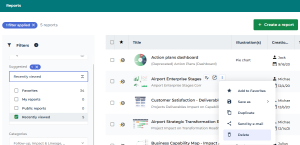
4. Click Yes to confirm deletion.
The report is deleted from the repository.
If needed, to undo this action: from HOPEX toolbar, click Undo  .
.