Managing Attributes and Sections
Reorganizing attributes and sections
You can reorganize the attributes and sections:
• reorganize the attributes within a section
• reorganize the added sections
The sections added to a page are placed below the standard ones.
• move an attribute into another section
To modify the organization of attributes and sections:
1. In the property page customization window, hover the cursor over the element (attribute or section) that you want to move.
2. Click the handle  of the element and drag and drop it to the required place.
of the element and drag and drop it to the required place.Removing an attribute
You can remove an attribute from a section.
 This attribute is not deleted from the repository.
To remove an attribute from a section:
1. (If needed) Hover the cursor over the section and click Expand panel  .
.
.2. Hover the cursor over the attribute and click Remove  .
.
.
Modifying an attribute
You can modify an attribute you have created as long as it has not been confirmed.
You cannot modify the other attributes (those created by other users or those provided as standard). Any attribute characteristic can be modified (Name, Description, Type, Format).
To modify a customized attribute:
1. In the page customization window, hover the cursor over the attribute concerned and click Modify  .
.
.
The attribute creation page appears.
2. Modify the attribute characteristics.
 You might need to modify its Description too.
3. Click Apply.
The attribute is modified.
Removing a section
You can remove a section added.
If the section includes created attributes, those are still available for reuse in your page.
To remove a section:
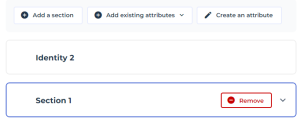
1. Hover the cursor over the section and click Remove .
.The section is removed. If created attributes were included, those are still available.
Rename a section
To rename a section:
1. Double-click the name of the section.

2. Enter the name of the section.
Maximum: 120 characters.
Handling sections
If you have many sections, to facilitate reading, you can reduce their display.
To modify the display of a section:
1. Hover the cursor over the section and click:
• Expand panel
• Collapse panel 