Ordering Elements
When several elements are positioned at the same place, they are overlaid on each other. The last element created is on top of the others. You can modify this order.
Sending a graphic object behind an element
To send a graphic object behind an element:
1. Select the graphic object.
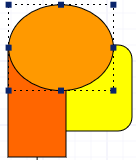
2. Right-click and select:
• Order > Bring Forward to bring the graphic element before the first element that overlays it.
• Order > Send Backward to send the graphic element behind the first element it overlays.
E.g.: select Send Backward to send the circle behind the sheet.
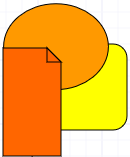
Bringing an element to front
To bring an element to front (in front of all the others):
1. Select the element.
2. In the shape editing bar of the diagram, click Front  .
.
.Sending an element back
To send an element back (behind all the others):
1. Select the element.
2. In the shape editing bar, click Back  .
.
.