Using service catalogs
Implementation of service catalogs
In HOPEX IT Architecture, a service catalog is made of service catalog item. For example, a hardware services catalog is made up of several hardware service catalog items.
 A hardware service catalog provides a centralized information source for the hardware services offered by the service provider organization. It contains a customer-oriented view of the hardware used, how they are supposed to be used, the processes that they support as well as the expected service quality level. The hardware service catalog presents the list of hardware functionalities mentioned as well as implementation recommendations.A hardware service catalog item defines which hardware functionality is in the catalog and which hardware artifacts provide the hardware functionality.
A Service catalog item represents a service which is associated with a capability or a functionality, depending on the type of catalog. The capabilities associated to the services of a service catalog are connected to a capability map (or a functionality map) which is associated to the service catalog.
With HOPEX IT Architecture, the technical solution providing a service is represented by an Implementation.
An implementation describes the relationship between a logical entity and a physical entity that implements it. The physical entity gives the list of logical entities that it implements.The table below draws up the summary of objects that implement the service catalog items according to their category.
Type of service catalog | Type of service elements | Type of service solutions |
|---|---|---|
Business function | Business capability | All types of technical and functional objects that implement a business capability with HOPEX IT Architecture. For more details, see Describing Fulfillment of a Business Capability. |
Cloud | Technology Capability Map | Cloud Services, see Using Cloud Services. |
Technical | Technology Capabilities | Software technologies, see Describing a Software Technology. |
Hardware | Hardware capabilities | Hardware and IoT Device, see Using Cloud Services. |
Defining a service catalog
The management principle of a service catalog is identical for all types of service catalogs. The types of service catalogs offered are:
• business service catalogs,
A business service catalog provides a centralized information source for the business services offered by the service provider organization. It contains a customer-oriented view of the services associated to business capabilities, how they are supposed to be used, the processes that they support as well as the expected service quality level. The business service catalog presents the list of functionalities mentioned as well as implementation recommendations.• Cloud services catalogs,
An information service catalog provides a centralized information source for the information services offered by the service provider organization. It contains a customer-oriented view of the information services used, how they are supposed to be used, the processes that they support as well as the expected service quality level. The information service catalog presents the list of functionalities mentioned as well as implementation recommendations.• Technology service catalogs,
A technology service catalog provides a centralized information source for the technology services offered by the service provider organization. It contains a customer-facing view of the technology services in use, how they are intended to be used, the process they enable, and the levels and quality of service the customer can expect from each service. The technology service catalog provides the list of reference technology capabilities and their recommended implementation.• hardware service catalogs.
A hardware service catalog provides a centralized information source for the hardware services offered by the service provider organization. It contains a customer-oriented view of the hardware used, how they are supposed to be used, the processes that they support as well as the expected service quality level. The hardware service catalog presents the list of hardware functionalities mentioned as well as implementation recommendations.This chapter is based on the example of an technology service catalog.
Creating a technology services catalog
To create a Technology service catalog:
1. From the Inventories navigation menu, select Deployment > Technology Service Catalogs.
The service catalogs access page opens.
2. Click on the arrow to the left of the Business service catalog field and select New.
A creation dialog box opens.
3. Enter the Name of your catalog and its Owner.
4. Select the Technology capability map associated to the service catalog and click OK.
A new service catalog appears in the edit area.
 Likewise, you can create a business service catalog or a hardware service catalog.
Adding a service catalog item
The Characteristics page of a service catalog provides access to:
• its Name,
• its Owner, by default, during creation of the logical application system, the current library.
• To access the list of service catalog items owned:
To add a Business service catalog item:
1. From the Inventories navigation menu, select Software > Business Service Catalogs.
The service catalogs access page opens.
2. From the drop-down list of the Business Service Catalog field, select the Business Service Catalog that interests you.
The list of service catalog items is displayed in the form of a tree that presents the capabilities associated to the services already declared as well as technical objects that represent the implemented solutions.
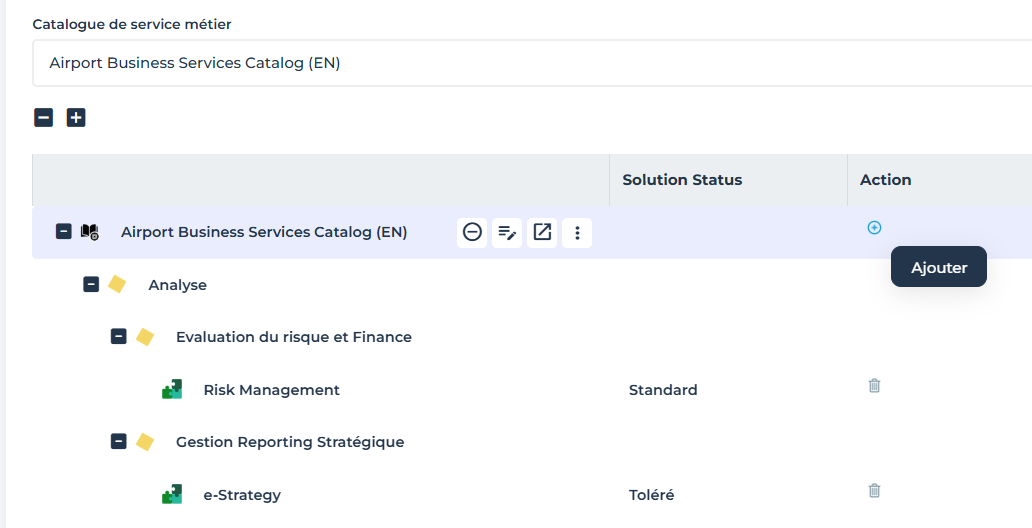
3. In the New column of a business service catalog, click the Add button.
A business service catalog item creation window opens.
4. Expand the tree branches to find the business capability that interests you.
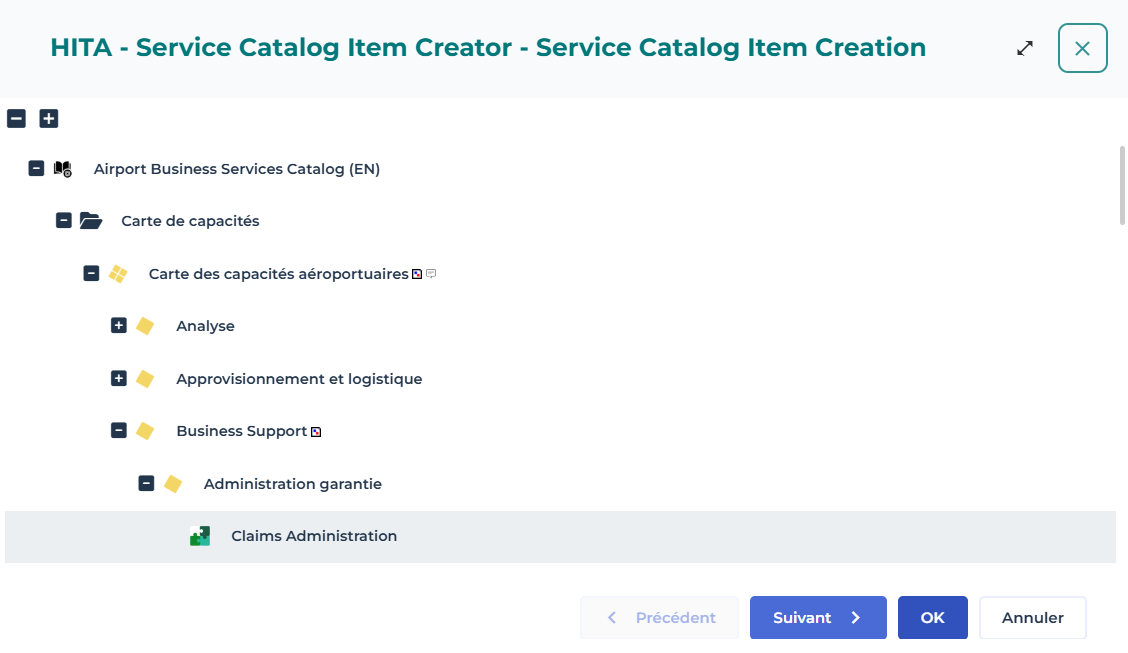
5. Select the object that implement the capability in the context of your business catalog.
For more details on implementation creation, see Using fulfillment mechanisms.6. Click Next.
A new page opens to specify the status of the object that represents the solution in the context of the service catalog.
• Norm: first choice, this choice is mandatory.
• Accepted: other choice accepted when it is not possible to use the Norm (please justify).
• Tolerated: tolerated for existing installations but for new uses.
• Prohibited: no installation should use this solution (existing or future).
• Emergent: for a solution currently under study.
• To be defined: for a solution to be defined.
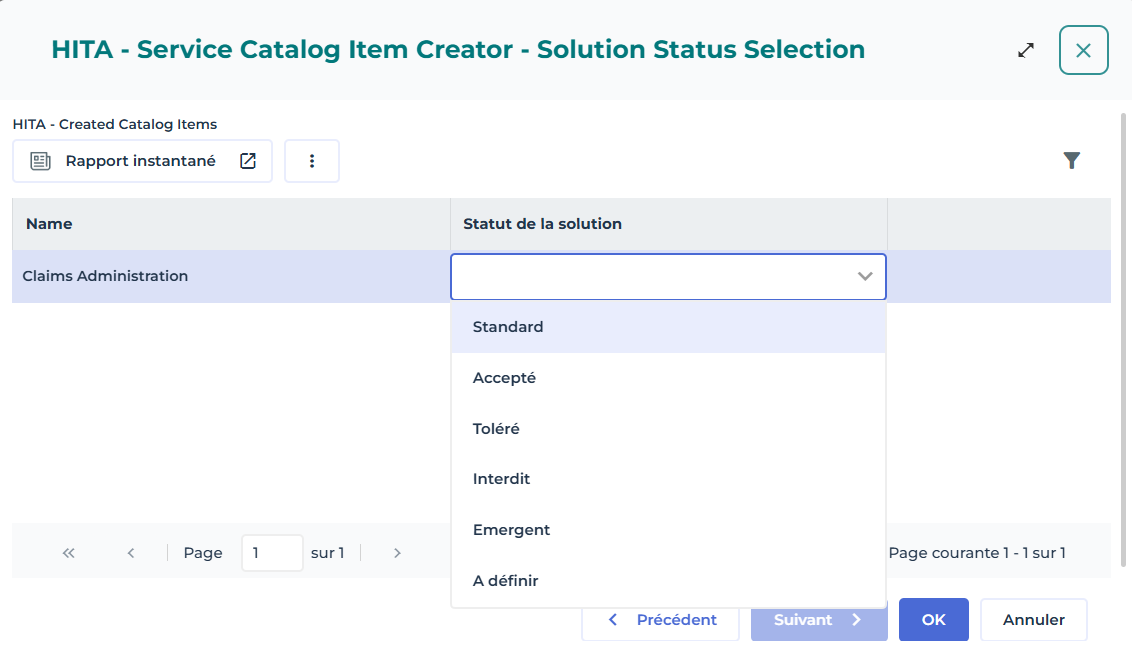
7. Select a status and click OK.
The catalog item pops up in the list with the associated technology capability.
Service catalog reports
The Services Coverage Matrix is a report presenting a list of service catalogs, the list of capabilities (or functionalities) covered, and for each of them, the implementation means.
Report parameters
This consists of defining report input data.
Settings | Parameter type | Constraints |
|---|---|---|
List of service catalogs | All types of service catalogs: - Business, - information, - technical, - hardware. | A mandatory catalog. |
Accessing a service catalog report
To access a service catalog report:
1. Open the Reports page of a service catalog.
2. Select the Services coverage matrices report.
3. In the Parameters section, select the service catalogs that you want to present in your report.
4. Click Refresh the Report.
The new report appears.