Using duplication with HOPEX IT Architecture
HOPEX IT Architecture solution provides facilities for specific building blocks duplication such as applications, application systems or deployment architectures.
To duplicate an application system, for example:
1. Right-click the application system you want to duplicate to open its pop-up menu.
2. Select Manage > Duplicate.
A dialog box opens to display the list of elements connected to the object to be duplicate.
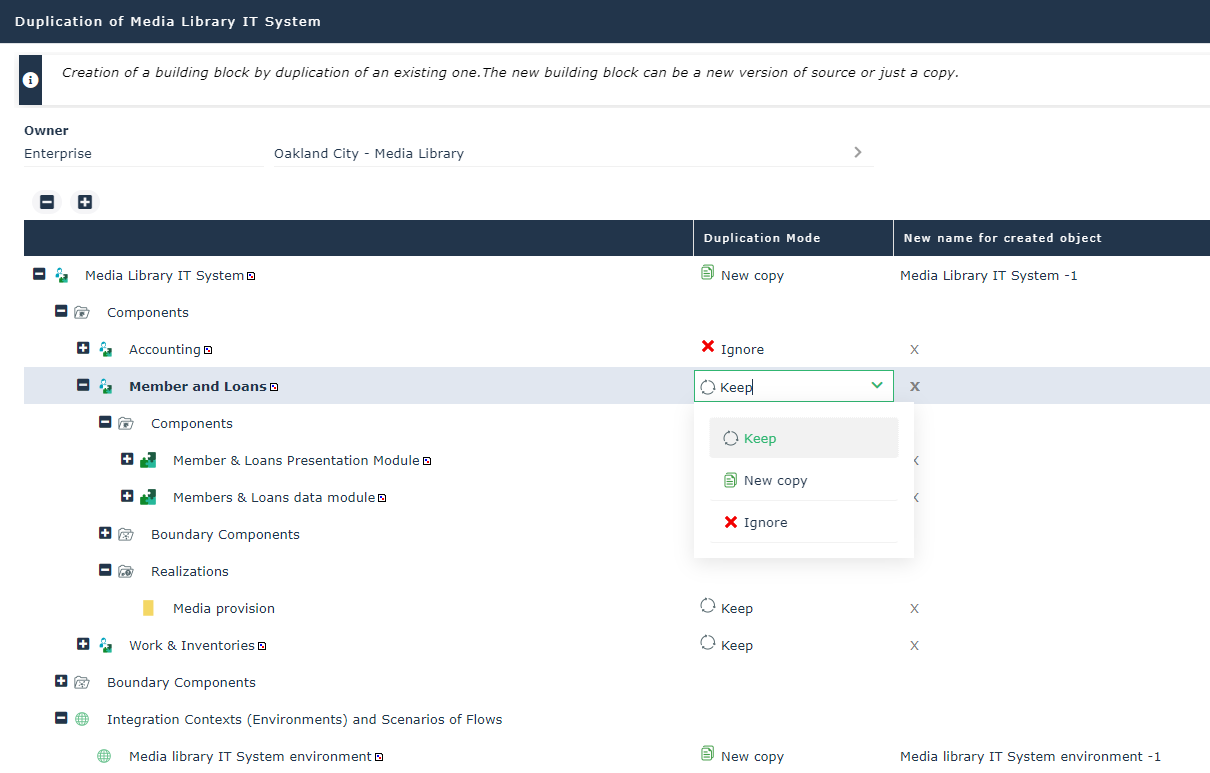
HOPEX IT Architecture duplication dialog box
3. Select the new building block owner.
4. For each component, the Duplication Mode column proposes the following options:
• Create a New copy of the selected component. In this case, the name of the new component appears in the New name for created object.
• Keep the component that will be owned by the source and the target building blocks.
• Ignore the component that will not be duplicated or referenced.
5. Click Launch Duplication to validate your choices.
The new building block can be accessed from its owner.
Using duplication with HOPEX IT Architecture in batch mode
A building block and the connected objects defined in the MetaModel, can be duplicated in batch mode.
The SmartDuplicate function provide the reference to the created building block.
The parameters of the SmartDuplicate function are defined in the sOptions string as follows:
• The function SmartDuplicate(ByVal sOptions As String) As MegaObject
• sOptions is definied with the following format “K1=V1,K2=V2, ...”, the proposed value are:
• Root=[NewCopy] - Default: NewCopy
ORoot relates to the duplicated building block
• Components=[Keep|NewCopy|Ignore] - Default: Keep
Components relate to the components of the building block which is duplicated.Components relate to the components of the building block which is duplicated.
• Boundaries=[Keep|Ignore] - Default: Keep
Boundaries relate to the components of the building block which is duplicated.Boundaries relate to the components of the building block which is duplicated.
• Scenarios=[Keep|Ignore] - Default: Keep
Scenarios relate to the components of the building block which is duplicated.Scenarios relate to the components of the building block which is duplicated.
• Environments=[Keep|Ignore] - Default: Keep
Environments relate to the components of the building block which is duplicated.Environments relate to the components of the building block which is duplicated.
Example of use:
Set newObject=
myApplication.SmartDuplicate("Root=NewCopy,Components=Keep,Environments=Ignore")