Creating an application Use Case Diagram
 To access UML functions, you must be connected with the Solution Architect profile or the Solution Architecture Functional Administrator profile.
A use case diagram enables description of service interactions between a system and actors of the organization.
 A use case is a series of actions leading to an observable result for a given actor. Scenarios illustrate use cases for example.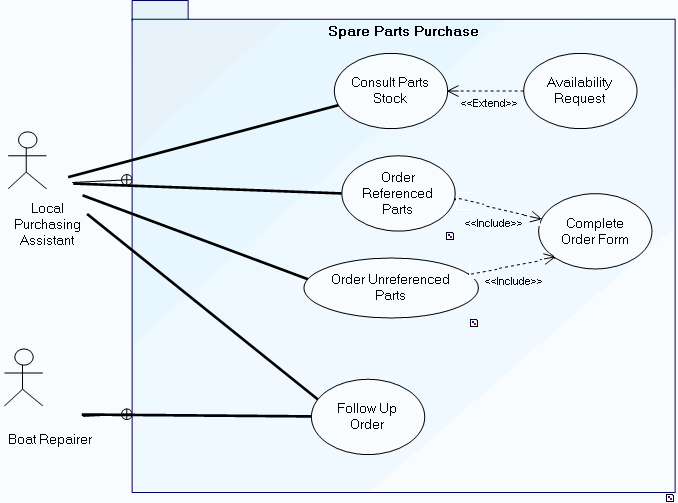
The system is used to consult parts in stock and to order new spare parts.
Consultation of parts in stock is carried out by the local on-site purchasing assistant. Following consultation, the assistant can make an availability request.
Two order types are possible, one for parts already referenced, the other for parts as yet unreferenced. In both cases, an order form should be completed.
Order follow-up is assured by the local purchasing assistant and the boat repairer.
For more details on use case diagrams, see Use Case Diagram.To create a use case diagram from an application, for example:
1. Open the Characteristics page of the appropriate object and expand the Use Case section.
2. Open the Diagrams property page of the use case you are interested in.
3. Click Create a diagram and select Use Case Diagram.
The diagram appears in the edit area.