Associations (IDEF1X)
 An association is a relationship existing between two classes.
Associations can be compared to links between index cards.
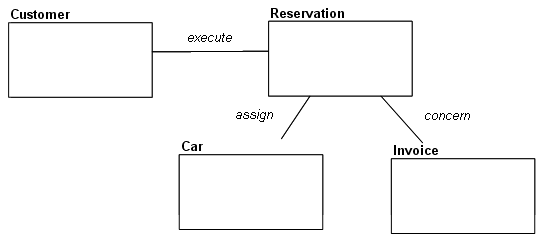
The following drawing provides a three-dimensional view of the situations a data diagram can store.
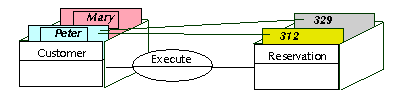
Peter and Mary are clients. Peter has made reservations numbers 312 and 329.
A data diagram should be able to store all situations in the context of the company, but these situations only.
 The diagram should not allow representing unrealistic or aberrant situations.
Examples of associations:
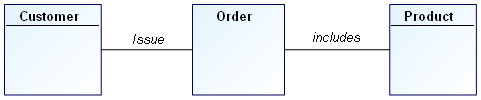
• A client issues an order.
• An order includes several products.
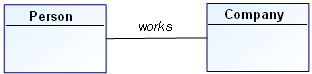
• A person works for a company.
• An alarm is triggered by a sensor.
• A sensor covers a zone.
• A window displays a string of characters.
Mandatory identifying relationship
A mandatory identifying relationship is an association between entities in which each instance of one entity is associated with zero, one or more instances of the second entity and each instance of the second entity is associated with one instance of the first entity and identified by this association. The second entity is always an identifier-dependant entity represented by a rounded corner box. The identifying relationship is represented by a solid line with a dot at the dependant entity end of the line.If an instance of the entity is identified by its association with another entity, then the relationship is referred to as an “identifying relationship”, and each instance of this entity must be associated with exactly one instance of the other entity. For example, if one or more tasks are associated with each project and tasks are only uniquely identified within a project, then an identifying relationship would exist between the entities "Project" and "Task". That is, the associated project must be known in order to uniquely identify one task from all other tasks (For more details, see Composite identifier). The child in an identifying relationship is always existence-dependent on the parent, ie., an instance of the child entity can exist only if it is related to an instance of the parent entity.
To create an identifying relationship:
1. In the diagram objects toolbar, click the Mandatory identifying relationship button 
2. Click the parent entity, and holding the mouse button down, drag the mouse to the child entity before releasing the button.
The association appears in the diagram. It is represented by a solid line with a dot at the dependent entity end of the line. The shape of the dependent entity is automatically changed to a rounded corner box.

Mandatory Identifying Relationship
In the above example, an order is composed of order lines, and each order line is identified through its association with the order. The order line is a dependent entity represented by a rounded corner box.
Mandatory non-identifying relationship
A mandatory non-identifying relationship is an association between entities in which each instance of one entity is associated with zero, one or more instances of the second entity and each instance of the second entity is associated with one instance of the first entity but not identified by this association. It is represented by a dashed line with a dot at the dependant entity end of the line.If every instance of an entity can be uniquely identified without knowing the associated instance of the other entity, then the relationship is referred to as a “non-identifying relationship.” For example, although an existence-dependency relationship may exist between the entities "Buyer" and "Purchase Order", purchase orders may be uniquely identified by a purchase order number without identifying the associated buyer.
To create a non-identifying relationship:
1. In the diagram objects toolbar, click the Mandatory non-identifying relationship button 
2. Click the parent entity, and holding the mouse button down, drag the mouse to the child entity before releasing the button.
The association appears in the diagram.

Mandatory Non-Identifying Relationship
In the above example, an order include one article, but is not identified through its association with the article.
Mandatory Non-Identifying Relationship
An optional relationship is an association between entities in which each instance of one entity is associated with zero, one or more instances of the second entity and each instance of the second entity is associated with zero or one instance of the first entity. It is represented by a dashed line with a dot at the second entity end of the line and a small diamond at the other end.In an optional non-identifying relationship, each instance of the child entity is related to zero or one instances of the parent entity.
An optional non-identifying relationship represents a conditional existence dependency. A dashed line with a small diamond at the parent end depicts an optional non-identifying relationship between the parent and child entities.
An instance of the child in which each foreign key attribute for the relationship has a value must have an associated parent instance in which the primary key attributes of the parent are equal in value to the foreign key attributes of the child.
To create an optional non-identifying relationship:
1. In the diagram insert toolbar, click the Optional relationship button  .
.
.2. Click the parent entity, and holding the mouse button down, drag the mouse to the child entity before releasing the button.
The association appears in the diagram.

Optional relationship
In the above example, an order should be invoiced to a client, but it is not mandatory (delivery problems, etc.).
non-specific relationship
A non-specific relationship is an association between entities in which each instance of the first entity is associated with zero, one or many instances of the second entity and each instance of the second entity is associated with zero, one or many instance of the first entity. It is depicted as a line drawn between the two associated entities with a dot at each end of the line.Non-specific relationships are used in high-level Entity-Relationship views to represent many-to-many associations between entities.
In the initial development of a model, it is often helpful to identify “non-specific relationships” between entities. These non-specific relationships are refined in later development phases of the model.
A non-specific relationship, also referred to as a “many-to-many relationship,” is an association between two entities in which each instance of the first entity is associated with zero, one, or many instances of the second entity and each instance of the second entity is associated with zero, one, or many instances of the first entity. For example, if an employee can be assigned to many projects and a project can have many employees assigned, then the connection between the entities "Employee" and "Project" can be expressed as a non-specific relationship. This non-specific relationship can be replaced with specific relationships later in the model development by introducing a third entity, such as "Project Assignment", which is a common child entity in specific connection relationships with the "Employee" and "Project" entities. The new relationships would specify that an employee has zero, one, or more project assignments. Each project assignment is for exactly one employee and exactly one project. Entities introduced to resolve non-specific relationships are sometimes called “intersection” or “associative” entities.
A non-specific relationship may be further defined by specifying the cardinality from both directions of the relationship.
To create a non-specific relationship:
1. In the diagram insert toolbar, click the non-specific relationship button  .
.
.2. Click the first entity, and holding the mouse button down, drag the mouse to the second entity before releasing the button.
The association appears in the diagram.

non-specific relationship
In the above example, an article can appear in zero, one or several catalogs and a catalog can contain zero, one or several articles.
Associative entity
An associative entity is an entity that is introduced to resolve a non-specific relationship or to display attributes as properties of an association.Non-specific relationships are used in high-level Entity-Relationship views to represent many-to-many associations between entities. In a keybased or fully-attributed view, all associations between entities must be expressed as specific relationships. However, in the initial development of a model, it is often helpful to identify “non-specific relationships” between entities. These non-specific relationships are refined in later development phases of the model.
Entities introduced to resolve non-specific relationships are sometimes called “intersection” or “associative” entities.
To create an associative entity:
1. In the diagram objects toolbar, click the Entity button 
2. Click in the diagram.
The Add Entity (DM) dialog box opens.
3. Enter the associative entity name.
4. Click Create (Windows Front-End) or Add(Web Front-End).
The entity appears in the diagram.
5. Click the Mandatory identifying relationship button.
button.6. Click the first entity, and holding the mouse button down, drag the mouse to the associative entity before releasing the button.
The association appears in the diagram. The shape of the associative entity changes for the a rounded corner box indicating that it is a dependent entity.
7. Create in the same way the second association by clicking the second entity, and holding the mouse button down, dragging the mouse to the associative entity before releasing the button.
You can add attributes to the associative entity.
Associative entity
In the above example, an article can be discounted for zero, one or several clients and a client can have discounts for zero, one or several articles. In each case, the discount rate is indicated on the associative class.
Defining Association Roles
A role enables indication of one of the entities concerned by the association. Indication of roles is particularly important in the case of an association between an entity and itself.Each end of an association specifies the role played by the entity in the association.
The role name is distinguished from the association name in the drawing by its position at the link end. In addition, the role name appears in a normal font, while the association name is italicized.

 The status bar (located at the bottom of the window) also allows identification of the different zones: when you move your mouse along the association, it indicates if you are on an association or on a role.
When two entities are linked by only one association, the names of the entities are often sufficient to describe the role. Role names are useful when several associations link the same two entities.
Certain associations may associate more than two entities. These associations are generally rare.
To add a role to an association:
1. Click on the Association Role button  and connect the association to the entity.
and connect the association to the entity.Multiplicities
Each role in an association has an indicated multiplicity to specify how many objects in the entity can be linked to an object in the other entity. Multiplicity is information related to the role and is specified as a completely bounded expression. This is indicated in particular for each role that entities play in an association.
Multiplicity specifies the minimum and maximum number of instances of an entity that can be linked by the association to each instance of the other entity.
The usual multiplicities are "1", "0..1", "*" or "0..*", "1..*", and "M..N" where "M" and "N" are integers:
• The “1” multiplicity indicates that each object of the entity is linked by this association once and once only.
It is represented as a mandatory relationship with a dot on the role and no dot on the opposite role.
• The “0..1” multiplicity indicates that at most one instance of the entity can be linked by this association.
It is pictured by a "Z" (for zero) on the role.
• The "*" or "0..*" multiplicity indicates that any number of instances of the entity can be linked by the association.
This is the default visibility.
• The "1..*" multiplicity multiplicity indicates that at least one instance of the entity is linked by the association.
It is pictured by a "P" (for positive) on the role.
• The “M..N” multiplicity indicates that at least M instances and at most N instances of the entity are linked by the association.
1 | One and one only |
0..1 | Zero or one (Z) |
M..N | From M to N (natural integer) |
* | From zero to several |
0..* | From zero to several |
1..* | From one to several (P) |
To specify role multiplicity:
1. Right-click the line between the association and the entity, to open the pop-up menu for the role.
2. Click Properties.
The properties page of the role opens.
3. Click the Characteristics tab.
4. In the Multiplicity field, select the required multiplicity.
The representation of the association changes according to its new multiplicities.