Associations (I.E)
 An association is a meaningful link between two objects. Associations are used to capture data about the relationship between two objects.
Overview
Associations can be compared to links between index cards.
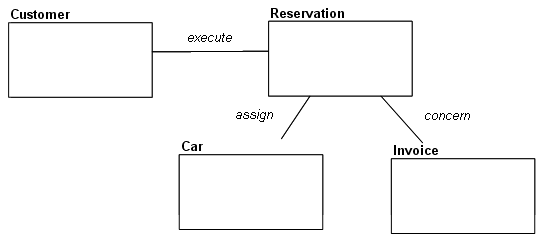
The following drawing provides a three-dimensional view of the situations a data diagram can store.
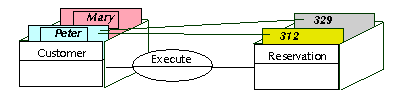
Peter and Mary are clients. Peter has made reservations numbers 312 and 329.
Associations and their Multiplicities
Each role in an association has an indicated multiplicity to specify how many objects in the entity can be linked to an object in the other entity. Multiplicity is information related to the role and is specified as a completely bounded expression. This is indicated in particular for each role that entities play in an association.
To indicate that a role is optional, a circle "O" is placed at the other end of the line, signifying a minimum multiplicity of 0.
To indicate that a role is mandatory, a stroke "|" is placed at the other end of the line, signifying a minimum multiplicity of 1.
A crows-foot is used for a multiplicity of "many".
In conjunction with a multiplicity of 0 or 1, a stroke "|" is often used to indicate a maximum multiplicity of 1.
With this arrangement, the combination "O|" indicates "at most one" and the combination "| |" or just a single "|" indicates "exactly one".
Mandatory relationship
 A mandatory relationship means that each instance of the first entity is associated with exactly one instance of the second entity and that the second entity can be associated with zero, one or many instances of the first entity.
In the above example, a client can issue zero, one or many orders, but an order is always issued by one and only one client.
Optional relationship
 An optional relationship means that each instance of the first entity is associated with zero or one instance of the second entity and that the second entity can be associated with zero, one or many instances of the first entity.
In the above example, a client can be invoiced for zero, one or many orders, and an order should be invoiced to a client, but it is not mandatory (delivery problems, etc.).
non-specific relationship
 A non-specific relationship means that each instance of the first entity is associated with zero, one or many instances of the second entity and that the second entity can be associated with zero, one or many instances of the first entity.
In the above example, an article can appear in zero, one or several catalogs and a catalog can contain zero, one or several articles.
Creating an Association
To create an association:
1. Select the type of association by clicking the corresponding button , or in the objects toolbar.
, or in the objects toolbar.2. Click one of the entities concerned, and holding the mouse button down, drag the mouse to the other entity, before releasing the button.
The Add Association dialog box opens.
3. Enter the name of the association, then click Create.
The association appears in the diagram.
To modify role multiplicity:
1. Right-click the line between the association and the entity, to open the pop-up menu for the role.
2. Click Properties.
The properties page of the role opens.
3. Click the Characteristics tab.
4. In the Multiplicity field, select the required multiplicity.
The representation of the association changes according to its new multiplicities.
 In HOPEX Windows Front-End, multiplicity is also displayed in the role's pop-up menu. If the menu you see does not propose multiplicity, check that you clicked on that part of the line indicating the role and not the association.