Defining the Components of a Concept Domain
You can update your business dictionaries using Concept Domains and dictionary elements that already exist: Term, Concept, State Concept, Event Concept or Concept View.
The components of a concept domain
A concept domain includes or references a set of concepts or sub-domains.
You can display the elements that belong to the concept domain in the properties window of the domain in question, in the Domain Entities page.
Adding a concept to a concept domain
To add a concept to a concept domain:
1. Open the properties window of the concept domain.
2. Select the Domain Entities page.
3. Click New.
The business information creation wizard appears.
4. Select the object type “Concept” and enter its name.
5. Click Add.
The concept is added to the list of concept domain components.
 You can also drag the concepts in question from the hierarchical view of the business dictionary into the section.
Connecting or deleting a component from a concept diagram
To connect a dictionary element to a list of components for a concept domain:
1. Open the concept diagram associated with the concept domain.
2. Add the dictionary element that interests you in the diagram.
3. Right-click on this element to open its pop-up menu.
4. Select Add to current Domain.
The element is added to the list of concept domain elements, in the Domain Entities page of the domain properties window.
To delete a dictionary element from a concept domain:
1. Right-click the dictionary element concerned to open its pop-up menu.
2. Select Remove from the current Domain.
The element is deleted from the list of concept domain elements.
Defining the access mode to the components (CRUD)
It is possible to specify the access rights to each component of a concept domain through the CRUD of the component in question (Create, Read, Update Delete).
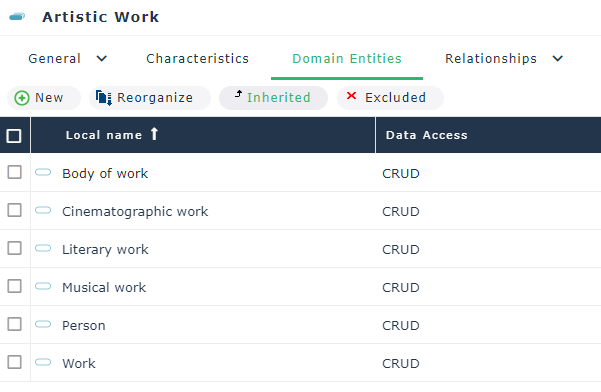
To define the CRUD for the component of a concept domain:
1. Open the properties window of the concept domain.
2. Click the Domain Entities page.
3. Select the line of the component in question.
Commands are added, including the CRUD button.
4. Click this button.
5. In the window that opens, select or clear the check boxes for each action: Create, Read, Update, Delete.
The content of the Data access column is calculated automatically according to the selected actions. This result appears in object form in the concept diagram associated with the concept domain.