Creating an Index
See previously: Database Tables.
Indexes are created automatically for primary and foreign keys. It is possible to add to the generated indexes columns used frequently in search criteria.
 It is also possible to specify an index in the Identifiers page of the properties dialog box of the entity to which the table belongs. An index specified in this way will be created in the table during synchronization.
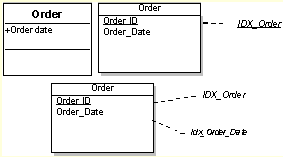
 Examples of indexes:
To create an index:
1. Open the properties of the table concerned.
The properties window appears.
2. Click the Characteristics page.
3. In the Index section, click New.
The Create Index page appears.
4. Specify the Local Name and click OK.
Depending on the possibilities offered by the DBMS, you can specify the index Type, index Sort direction ("Ascending" or "Descending"), and if it is a grouped index (Clustered).
It is then possible to select the columns of the key (or index) in the Columns page of the properties dialog box of the index.