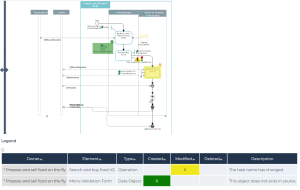
Process Revisions Diagram Comparison
Context
This report allows to compare process revision diagrams.
 See Process Revisions.
It enables to easily see the updated objects between two process revisions - such as operations, processes, gateways, shared objects and org-units.
Path
Process Revisions property page of the process > Compare diagrams.
Procedure
1. Select the Source Revision and the Target Revision.
2. In the Diagram field, select Process Diagram.
3. Click Refresh the report if needed.
By default the diagrams are overlaid.
4. To the right of the diagram, select the scrolling bar, hold your click down and drag the cursor to the left to display the target diagram (the more recent diagram) and see the differences in the target diagram:
• created objects and links are marked in green
• modified objects and links are marked in yellow
• deleted objects are marked in red