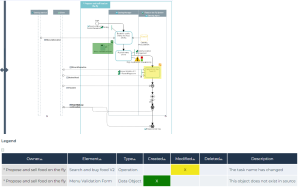
Process Diagram comparison over time
Context
This report enables easy comparison of process archives, provided that repository snapshots have been created beforehand.
More specifically it allows to compare a process diagram over time by selecting:
• two repository snapshots
• a process revision with a repository snapshot
 See Process Revisions.
Path
Navigation bar > Reports > Create a report.
Procedure
To create a diagram comparison report:
1. Click the Create a report button and search Process Diagram Comparison over time.
2. Hover over the adequate report and click Create a report.
3. In the Process field, connect the process of your choice.
4. In the Source and Target fields, connect the revisions and/or snapshots you want to compare.
5. Click Preview.
Result