HOPEX Business Process Analysis Desktop presentation
The homepage and the navigation menus available in HOPEX Business Process Analysis depend on the profile with which you are connected.
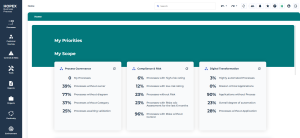
Homepage
The HOPEX Business Process Analysis homepage is composed of the following sections:
• The header, showing goals assigned to your profile and useful links to the use of HOPEX.
 These can be defined in the Administrator' Administration> Methodological Domain menu.
• My scope, presenting some statistics related to repository contents.
• Quick Access, offering useful shortcuts to
• recently viewed objects
• favorite objects
• process diagram creation
• My favorite report, displaying the report of your choice.
For further information, see Homepage description.Navigation Menus
The HOPEX Business Process Analysis navigation menus are:
Processes
The Processes menu provides access to the following objects:
• Processes
See Processes.• Process Map and Process Category
See Process Hierarchy.• Org Unit
• Application
Customer Journey
The Customer Journey menu gives access to Customer Journey Map. You need to use HOPEX Customer Journey.
See Customer Journey.Controls & Risks
This menu provides access to risk management functionalities. You need to use HOPEX Risk Mapper.
See Risks and Controls.Tools
Reports
This menu provides access to all reports, enabling analyzing objects and their use.
Projects
The Projects menu provides access to transformation project management. Depending on the products you have access to, you can see the following sub-menus:
• Process Portfolios, to access the portfolio management features offered with product HOPEX Portfolio & Planning.
• Action Plans, to describe and manage the action plans linked to the transformation of processes.
See Action Plans.• Ideation
• Projects, to manage transformation projects (you need to have access to HOPEX IT Portfolio Management).
See the HOPEX IT Business Management guide.Continuity
This menu can only be accessed by the Process Manager and Process Functional Administrator profiles.
The Continuity menu, available with the HOPEX BCM product, provides access to the following Business Continuity Management functionalities.
For more details on Business Continuity Management, see Introduction to HOPEX BCM.Environment
This menu can only be accessed by the Process Manager and Process Functional Administrator profiles.
It gives access to the following functionalities:
• Standard Navigation, to access the main objects processed with the HOPEX Business Process Analysis solution.
• Indicators, to access to the key indicators of your repository.
• Data Management to access Business Dictionaries and Concept Domains.
• Common
See Using Sketches. See Tags.Administration
This menu can only be accessed with the Process Functional Administrator profile. It provides Assessment and Business Continuity management features.