Managing Indicator Statuses
Creating indicator statuses
To create indicator statuses:
1. In the navigation bar, select Administration > Indicators > Statuses.
2. Click New.
3. Select a Status color for your new status.
4. Click OK.
The new status you have just created will appear in the list of statuses available when creating an indicator interpretation logic. For more information, see Managing Indicator Interpretation logics.
Computation of indicator statuses
The following statuses are available by default:
• Unknown
• Operational
• Warning
• Unsatisfactory
• Critical
• Failed
The indicator status is computed through an indicator interpretation logic linked to the indicator category. Hereafter are computation rules for the standard interpretation logics.
|
Interpretation Logics
|
Details
|
Visual representation
|
|---|---|---|
|
Standard
|
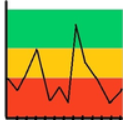
Default rule to compute the status of "Standard" Key Indicators
The Key Indicator is "Failed" for every value smaller than the lower threshold. For bigger values, the Key Indicator status goes from Critical to Operational, passing through Unsatisfactory and Warning.
The status of the key indicator is Operational for values above the lower threshold + 0.75*(higher threshold - lower threshold).
|
 |
|
Reverse
|
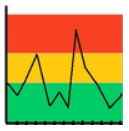
Default rule to compute the status of Reverse Indicators.
This rule implements the reverse logic to that used for Standard category key indicators.
The Key Indicator is "failed" for every value higher than the higher threshold. For values below the higher threshold, the Key Indicator status goes from Critical to Operational, passing through Unsatisfactory and Warning.
The status of the key indicator is Operational for values lower than the higher threshold - 0.75*(higher threshold - lower threshold).
|
 |
|
Accepted Values
|
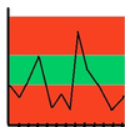
Default rule to compute the status of Accepted Values indicators.
The Key Indicator is "Failed" for every value outside the thresholds. For values within the thresholds, and as the value of the key indicator moves away from the center, the Key Indicator status goes from Operational to Critical, passing through Warning and Unsatisfactory.
The status of the key indicator is Operational for values in the range (higher threshold + lower threshold)/2 +/- 0.25*(higher threshold - lower threshold).
|
 |
|
Rejected values
|
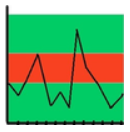
Default rule to compute status of "Rejected Values" indicators.
The Key Indicator is in Failed status for every value within the thresholds. For values outside the thresholds, and as the value of the key indicator moves away from these thresholds, the Key Indicator status goes from Critical to Operational, passing through Unsatisfactory and Warning.
The status of the key indicator is Operational for values above the higher threshold + 0.25*(higher threshold - lower threshold) (or values below the lower threshold - 0.25*(higher threshold - lower threshold)).
|
 |